
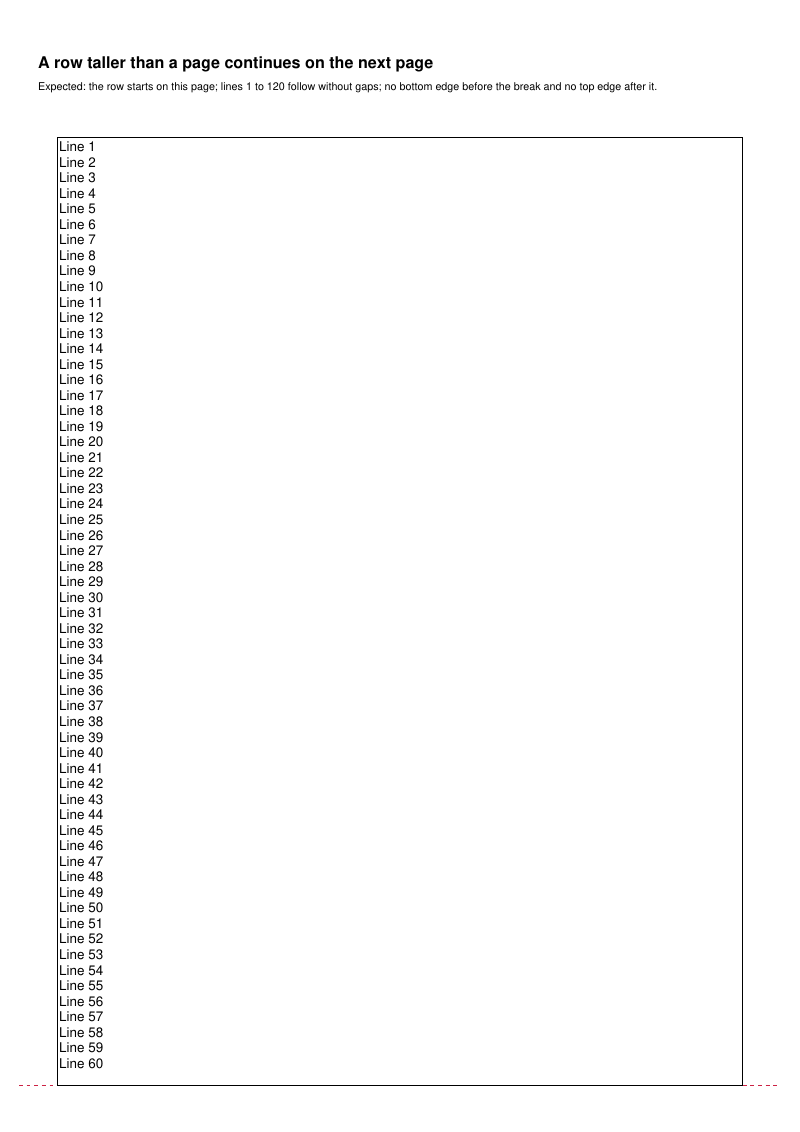
HTML table rows taller than a page continuing on the next pages (with backgrounds, a repeated table head, a keep-together table and a link), and cells spanning rows over a page break, with the expected result of each case.
- Rendered PDF: E092_html_table_row_split.pdf
- PHP source: E092_html_table_row_split.phps
- All examples: /examples/
- Category: HTML and CSS
- Guide: HTML and CSS
Source Code
<?php

declare(strict_types=1);

/**
 * E092_html_table_row_split.php
 *
 * Visual inspection sheet for HTML table rows taller than a page, which continue
 * on the next pages, for cells spanning rows over a page break, and for table heads
 * and captions near the page bottom. Each case states the expected result.
 *
 * @since       2026-10-10
 * @category    Library
 * @package     Pdf
 * @author      Nicola Asuni <info@tecnick.com>
 * @copyright   2002-2026 Nicola Asuni - Tecnick.com LTD
 * @license     https://www.gnu.org/copyleft/lesser.html GNU-LGPL v3 (see LICENSE)
 * @link        https://github.com/tecnickcom/tc-lib-pdf
 *
 * This file is part of tc-lib-pdf software library.
 */

// NOTE: local file reads (images, fonts, attachments) are restricted to an allowlist of
// trusted paths that covers this package tree, so run the examples in place. To read assets
// from other locations, list them in the 'allowedPaths' entry of the fileOptions constructor
// parameter (see E047_remote_resources_security.php).

// NOTE: run make fonts in the project root to generate the dependencies and example fonts.

// autoloader when using Composer
require __DIR__ . '/../vendor/autoload.php';

// define fonts directory
\define('K_PATH_FONTS', \realpath(__DIR__ . '/../vendor/tecnickcom/tc-lib-pdf-font/target/fonts'));

$pdf = new \Com\Tecnick\Pdf\Tcpdf();

$pdf->setCreator('tc-lib-pdf');
$pdf->setAuthor('Nicola Asuni');
$pdf->setSubject('tc-lib-pdf example: 092');
$pdf->setTitle('HTML Table Row Split');
$pdf->setKeywords('TCPDF tc-lib-pdf example html table row page break rowspan nobr thead caption');
$pdf->setPDFFilename('092_html_table_row_split.pdf');

$selectFont = function (string $family = 'helvetica', string $style = '', float $size = 10) use ($pdf): void {
    $font = $pdf->font->insert($pdf->pon, $family, $style, $size);
    $pdf->page->addContent($font['out']);
};

// Reference geometry drawn over the cases.
$guideStyle = [
    'lineWidth' => 0.3,
    'lineCap' => 'butt',
    'lineJoin' => 'miter',
    'dashArray' => [1, 1],
    'dashPhase' => 0,
    'lineColor' => '#cc2244',
];

/**
 * Writes a note in absolute page coordinates.
 */
$note = function (string $txt, float $posx, float $posy, float $width, string $style = '', float $size = 8) use (
    $pdf,
    $selectFont,
): void {
    $selectFont('helvetica', $style, $size);
    $pdf->page->addContent($pdf->getTextCell(
        txt: $txt,
        posx: $posx,
        posy: $posy,
        width: $width,
        valign: \Com\Tecnick\Pdf\TextVAlign::Top,
        halign: \Com\Tecnick\Pdf\TextHAlign::Left,
    ));
};

/**
 * Adds a page with a title and a mark at the region bottom, and returns the ordinate
 * of the case.
 */
$drawTitle = function (string $title, string $expected) use ($pdf, $note, $guideStyle): float {
    // The pages added by the page breaks keep these margins.
    $pdf->addPage(['margin' => ['PT' => 12, 'PB' => 12, 'CT' => 12, 'CB' => 12]]);
    $note($title, 10, 14, 190, 'B', 12);
    $note('Expected: ' . $expected, 10, 21, 190, '', 8);
    $region = $pdf->page->getRegion();
    $bottom = $region['RY'] + $region['RH'];
    $pdf->page->addContent($pdf->graph->getLine(5, $bottom, 205, $bottom, $guideStyle));

    return 36.0;
};

/**
 * Returns numbered lines joined with line breaks.
 */
$lines = function (string $prefix, int $num): string {
    $out = [];
    for ($idx = 1; $idx <= $num; ++$idx) {
        $out[] = $prefix . ' ' . $idx;
    }

    return \implode('<br />', $out);
};

// ----------
// Part 1: rows taller than a page.
// ----------

$posy = $drawTitle(
    'A row taller than a page continues on the next page',
    'the row starts on this page; lines 1 to 120 follow without gaps; no bottom edge before the break '
    . 'and no top edge after it.',
);
$selectFont();
$pdf->addHTMLCell(
    '<table border="1" cellpadding="2"><tr><td>' . $lines('Line', 120) . '</td></tr></table>',
    15,
    $posy,
    180,
);

$posy = $drawTitle(
    'Two cells of different heights, with a table head',
    'both cells keep their background on every page; the head repeats at the top of the next page; the '
    . 'next row starts below the taller cell.',
);
$selectFont();
$pdf->addHTMLCell(
    '<table border="1" cellpadding="2"><thead><tr style="background-color:#cccccc"><th>Column A</th>'
    . '<th>Column B</th></tr></thead><tr><td style="background-color:#ffeecc">'
    . $lines('A', 40)
    . '</td><td style="background-color:#ccddff">'
    . $lines('B', 120)
    . '</td></tr><tr><td>next row</td><td>next row</td></tr></table>',
    15,
    $posy,
    180,
);

$posy = $drawTitle(
    'Reference: a row that fits an empty page moves to the next page whole',
    'this page holds no part of the table; the 60 lines are together on the next page.',
);
$selectFont();
$region = $pdf->page->getRegion();
$pdf->addHTMLCell(
    '<table border="1" cellpadding="2"><tr><td>' . $lines('Line', 60) . '</td></tr></table>',
    15,
    $region['RY'] + $region['RH'] - 80,
    180,
);

$posy = $drawTitle(
    'Keep-together table taller than a page (nobr="true")',
    'the table cannot be kept together, so it starts on this page and continues on the next one.',
);
$selectFont();
$pdf->addHTMLCell(
    '<table border="1" cellpadding="2" nobr="true"><tr><td>' . $lines('Line', 120) . '</td></tr></table>',
    15,
    $posy,
    180,
);

$posy = $drawTitle(
    'A link in the continuation of a split row',
    'the link at the end of the cell is on the next page, and it is active there.',
);
$selectFont();
$pdf->addHTMLCell(
    '<table border="1" cellpadding="2"><tr><td>'
    . $lines('Line', 100)
    . '<br /><a href="https://tcpdf.org">link to tcpdf.org</a></td></tr></table>',
    15,
    $posy,
    180,
);

// ----------
// Part 2: cells spanning rows over a page break.
// ----------

/**
 * Returns a table whose first cell spans the given number of rows.
 */
$spanTable = function (int $num): string {
    $rows = '';
    for ($idx = 1; $idx <= $num; ++$idx) {
        $rows .=
            '<tr>'
            . ($idx === 1 ? '<td rowspan="' . $num . '" style="background-color:#ffcc00">spanning cell</td>' : '')
            . '<td>row '
            . $idx
            . '<br />second line<br />third line<br />fourth line</td></tr>';
    }

    return '<table border="1" cellpadding="2">' . $rows . '<tr><td>last</td><td>row</td></tr></table>';
};

$posy = $drawTitle(
    'Rows spanned by a cell, near the page bottom',
    'the six rows and the spanning cell move together to the next page.',
);
$selectFont();
$region = $pdf->page->getRegion();
$pdf->addHTMLCell($spanTable(6), 15, $region['RY'] + $region['RH'] - 40, 180);

$posy = $drawTitle(
    'A cell spanning more rows than a page holds',
    'the spanning cell is on every page of its rows, with its background, without a bottom edge before a '
    . 'break or a top edge after it; rows 1 to 40 follow without gaps.',
);
$selectFont();
$pdf->addHTMLCell($spanTable(40), 15, $posy, 180);

// ----------
// Part 3: table heads and captions near the page bottom.
// ----------

/**
 * Returns a table with a head, the given body rows and an optional caption.
 */
$headTable = function (int $num, string $caption = ''): string {
    $rows = '';
    for ($idx = 1; $idx <= $num; ++$idx) {
        $rows .= '<tr><td>row ' . $idx . '</td><td>text ' . $idx . '</td></tr>';
    }

    return (
        '<table border="1" cellpadding="2">'
        . $caption
        . '<thead><tr style="background-color:#cccccc"><th>Column A</th><th>Column B</th></tr></thead><tbody>'
        . $rows
        . '</tbody></table>'
    );
};

$posy = $drawTitle(
    'A table head that does not fit above the page bottom',
    'the table starts 3 mm above the dashed line; this page holds no part of it; the next page starts with '
    . 'the head drawn once, followed by rows 1 to 6.',
);
$selectFont();
$region = $pdf->page->getRegion();
$pdf->addHTMLCell($headTable(6), 15, $region['RY'] + $region['RH'] - 3, 180);

$posy = $drawTitle(
    'A table head that fits above the page bottom without its first row',
    'the table starts 8 mm above the dashed line; the head is not left alone on this page; the next page '
    . 'starts with the head drawn once, followed by rows 1 to 6.',
);
$selectFont();
$region = $pdf->page->getRegion();
$pdf->addHTMLCell($headTable(6), 15, $region['RY'] + $region['RH'] - 8, 180);

$posy = $drawTitle(
    'A top caption that fits above the page bottom without the first row',
    'the table starts 12 mm above the dashed line; the caption is not left alone on this page; the next '
    . 'page starts with the caption, then the head, followed by rows 1 to 6.',
);
$selectFont();
$region = $pdf->page->getRegion();
$pdf->addHTMLCell($headTable(6, '<caption>Top caption</caption>'), 15, $region['RY'] + $region['RH'] - 12, 180);

$posy = $drawTitle(
    'A bottom caption that does not fit below the last row',
    'the table starts 28 mm above the dashed line; this page holds the head and rows 1 to 3; the next page '
    . 'starts with the repeated head, followed by row 4 and the caption below it; nothing is drawn below the '
    . 'dashed line.',
);
$selectFont();
$region = $pdf->page->getRegion();
$pdf->addHTMLCell(
    $headTable(4, '<caption style="caption-side:bottom">Bottom caption</caption>'),
    15,
    $region['RY'] + $region['RH'] - 28,
    180,
);

// =============================================================

$rawpdf = $pdf->getOutPDFString();

$pdf->renderPDF(rawpdf: $rawpdf);