
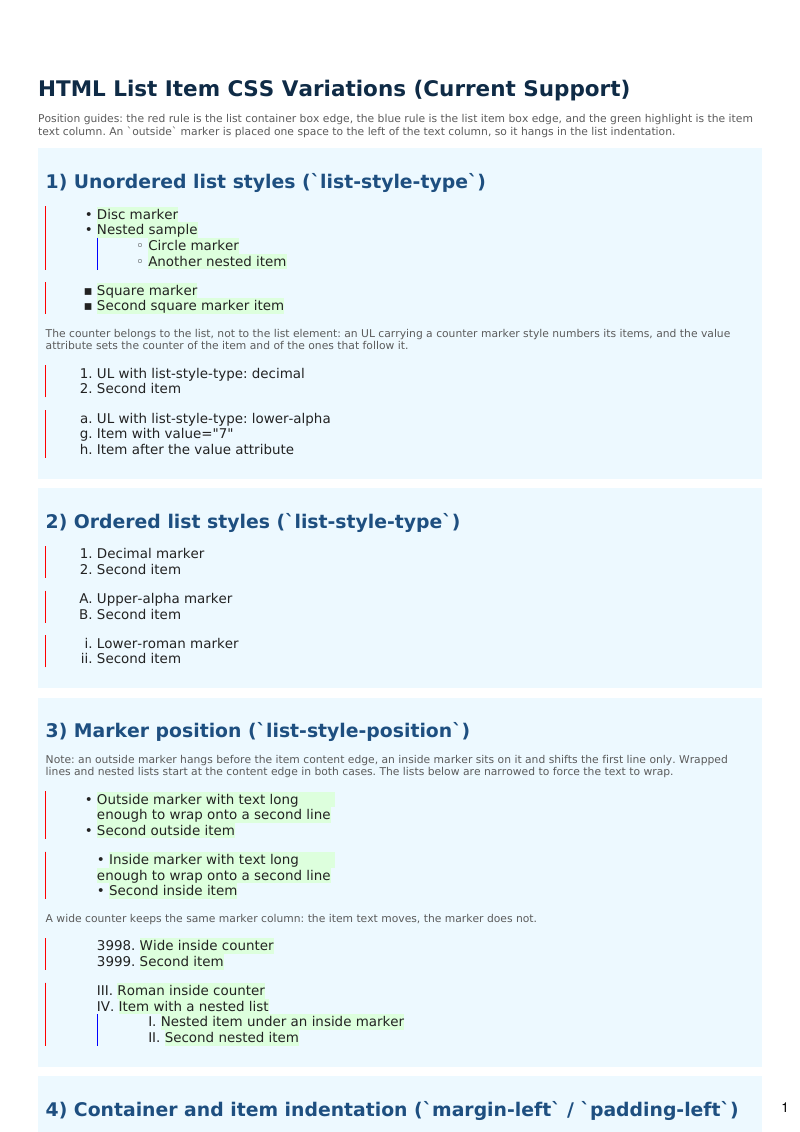
Ordered, unordered, and nested lists, with the CSS list-style properties applied to each.
- Rendered PDF: E032_html_lists.pdf
- PHP source: E032_html_lists.phps
- All examples: /examples/
- Category: HTML and CSS
- Guide: HTML and CSS
Source Code
<?php

declare(strict_types=1);

/**
 * E032_html_lists.php
 *
 * @since       2026-04-28
 * @category    Library
 * @package     Pdf
 * @author      Nicola Asuni <info@tecnick.com>
 * @copyright   2002-2026 Nicola Asuni - Tecnick.com LTD
 * @license     https://www.gnu.org/copyleft/lesser.html GNU-LGPL v3 (see LICENSE)
 * @link        https://github.com/tecnickcom/tc-lib-pdf
 *
 * This file is part of tc-lib-pdf software library.
 */

// NOTE: local file reads (images, fonts, attachments) are restricted to an allowlist of
// trusted paths that covers this package tree, so run the examples in place. To read assets
// from other locations, list them in the 'allowedPaths' entry of the fileOptions constructor
// parameter (see E047_remote_resources_security.php).

// NOTE: run make fonts in the project root to generate the dependencies and example fonts.

// autoloader when using Composer
require __DIR__ . '/../vendor/autoload.php';

// define fonts directory
\define('K_PATH_FONTS', \realpath(__DIR__ . '/../vendor/tecnickcom/tc-lib-pdf-font/target/fonts'));

// autoloader when using RPM or DEB package installation
//require ('/usr/share/php/Com/Tecnick/Pdf/autoload.php');

// main TCPDF object
$pdf = new \Com\Tecnick\Pdf\Tcpdf(
    unit: \Com\Tecnick\Pdf\Page\Unit::Millimeter,
    isunicode: true,
    subsetfont: false,
    compress: true,
    mode: \Com\Tecnick\Pdf\PdfConformance::None,
    objEncrypt: null,
);

$pdf->setCreator('tc-lib-pdf');
$pdf->setAuthor('Nicola Asuni');
$pdf->setSubject('tc-lib-pdf example: 032');
$pdf->setTitle('HTML List Item CSS Variations');
$pdf->setKeywords('TCPDF tc-lib-pdf example html list css ul ol li');
$pdf->setPDFFilename('032_html_lists.pdf');

$pdf->setViewerPreferences(['DisplayDocTitle' => true]);
$pdf->enableDefaultPageContent();

$bfont = $pdf->font->insert($pdf->pon, 'dejavusans', '', 10);
// $bfont = $pdf->font->insert($pdf->pon, 'helvetica', '', 10);

$pdf->addPage();
$pdf->setBookmark(
    name: 'HTML list item CSS variations',
    link: '',
    level: 0,
    page: -1,
    posx: 0,
    posy: 0,
    fstyle: 'B',
    color: '',
);
$pdf->page->addContent($bfont['out']);

// This example showcases all currently supported list-item CSS behavior:
// - list-style-type
// - list-style-position (inside / outside)
// - margin-left / padding-left
// - text-indent first-line behavior on list-item text
// - nested OL/UL interactions
// - li::marker styling (color, font-weight, font-style)
// - list-style-image CSS property parsing (SVG and PNG data URIs)
// - vector unordered markers, drawn when the font has no glyph for them
// - decimal fallback for counter styles the font cannot render
// - the presentational type attribute on OL, UL and LI
// - alphabetic counters wrapping past the end of the alphabet
// - additive counter styles (hebrew, armenian, georgian, cjk-ideographic)
// - decimal fallback for counters outside the range of their counter style
// - right-to-left lists, including list-style-position

$html = <<<HTML
    <style>
    body {
      color: #222222;
      font-size: 10pt;
    }
    h1 {
      color: #0f2b46;
      margin-bottom: 3mm;
    }
    h2 {
      color: #1e4f80;
      margin-top: 4mm;
      margin-bottom: 2mm;
    }
    .note {
      font-size: 8pt;
      color: #5b5b5b;
    }
    .panel {
      background-color: #edf9ff;
      padding: 2mm;
      margin-bottom: 2.5mm;
    }

    /* Variation set: list-style-type */
    .ul-disc { list-style-type: disc; }
    .ul-circle { list-style-type: circle; }
    .ul-square { list-style-type: square; }
    .ol-decimal { list-style-type: decimal; }
    .ol-upper-alpha { list-style-type: upper-alpha; }
    .ol-lower-roman { list-style-type: lower-roman; }

    /* Variation set: list-style-position */
    .pos-inside { list-style-position: inside; }
    .pos-outside { list-style-position: outside; }
    .narrow { margin-right: 110mm; }

    /* Variation set: margin/padding on containers and items */
    .list-shift-a {
      margin-left: 0mm;
      padding-left: 3mm;
    }
    .list-shift-b {
      margin-left: 6mm;
      padding-left: 1mm;
    }
    .list-shift-c {
      margin-left: 10mm;
      padding-left: 0mm;
    }
    .list-shift-a li { margin-left: 0mm; padding-left: 0mm; }
    .list-shift-b li { margin-left: 1mm; padding-left: 1mm; }
    .list-shift-c li { margin-left: 2mm; padding-left: 0mm; }

    /* Variation set: text-indent (first-line and hanging) */
    .indent-first li { text-indent: 4mm; }
    .indent-hanging li { text-indent: -2mm; }

    /* Variation set: li::marker styling */
    .marker-red li::marker { color: red; }
    .marker-blue li::marker { color: blue; }
    .marker-green li::marker { color: #008000; }

    /* Variation set: marker glyph availability */
    .core-font { font-family: helvetica; }
    .jp-font { font-family: unifont_jp; }
    .ol-hiragana { list-style-type: hiragana; }
    .ol-katakana-iroha { list-style-type: katakana-iroha; }
    .ol-cjk { list-style-type: cjk-ideographic; }

    /* Variation set: counter ranges and additive counter styles */
    .ol-lower-alpha { list-style-type: lower-alpha; }
    .ol-upper-roman { list-style-type: upper-roman; }
    .ol-lower-greek { list-style-type: lower-greek; }
    .ol-hebrew { list-style-type: hebrew; }
    .ol-armenian { list-style-type: upper-armenian; }
    .ol-georgian { list-style-type: georgian; }

    /* Variation set: list-style-image (custom bullets) */
    .list-img-svg { list-style-image: url(data:image/svg+xml;base64,PHN2ZyB4bWxucz0iaHR0cDovL3d3dy53My5vcmcvMjAwMC9zdmciIHdpZHRoPSI4IiBoZWlnaHQ9IjgiPjxjaXJjbGUgY3g9IjQiIGN5PSI0IiByPSI0IiBmaWxsPSIjRkY2NjAwIi8+PC9zdmc+); }
    .list-img-png { list-style-image: url(data:image/png;base64,iVBORw0KGgoAAAANSUhEUgAAAAEAAAABCAIAAACQd1PeAAAACXBIWXMAAA7EAAAOxAGVKw4bAAAADElEQVQImWNgYAgCAABWAFO8xnxsAAAAAElFTkSuQmCC); }

    /* Position guides, visual hints only: they do not change the layout.
       red   = list container box edge
       blue  = list item box edge
       green = item text column, the edge the marker is anchored to */
    .marker-guide {
      border-left: 0.2mm solid #ff0000;
    }
    .item-guide li {
      border-left: 0.2mm solid #0000ff;
    }
    .col {
      background-color: #ddffdd;
    }
    </style>

    <h1>HTML List Item CSS Variations (Current Support)</h1>

    <p class="note">Position guides: the red rule is the list container box edge, the blue rule is
    the list item box edge, and the green highlight is the item text column. An `outside` marker is
    placed one space to the left of the text column, so it hangs in the list indentation.</p>

    <div class="panel">
      <h2>1) Unordered list styles (`list-style-type`)</h2>
      <ul class="ul-disc marker-guide item-guide">
        <li><span class="col">Disc marker</span></li>
        <li><span class="col">Nested sample</span>
          <ul class="ul-circle">
            <li><span class="col">Circle marker</span></li>
            <li><span class="col">Another nested item</span></li>
          </ul>
        </li>
      </ul>
      <ul class="ul-square marker-guide item-guide">
        <li><span class="col">Square marker</span></li>
        <li><span class="col">Second square marker item</span></li>
      </ul>
      <p class="note">The counter belongs to the list, not to the list element: an UL carrying a
      counter marker style numbers its items, and the value attribute sets the counter of the item
      and of the ones that follow it.</p>
      <ul class="ol-decimal marker-guide">
        <li>UL with list-style-type: decimal</li>
        <li>Second item</li>
      </ul>
      <ul class="ol-lower-alpha marker-guide">
        <li>UL with list-style-type: lower-alpha</li>
        <li value="7">Item with value="7"</li>
        <li>Item after the value attribute</li>
      </ul>
    </div>

    <div class="panel">
      <h2>2) Ordered list styles (`list-style-type`)</h2>
      <ol class="ol-decimal marker-guide">
        <li>Decimal marker</li>
        <li>Second item</li>
      </ol>
      <ol class="ol-upper-alpha marker-guide">
        <li>Upper-alpha marker</li>
        <li>Second item</li>
      </ol>
      <ol class="ol-lower-roman marker-guide">
        <li>Lower-roman marker</li>
        <li>Second item</li>
      </ol>
    </div>

    <div class="panel">
      <h2>3) Marker position (`list-style-position`)</h2>
      <p class="note">Note: an outside marker hangs before the item content edge, an inside marker
      sits on it and shifts the first line only. Wrapped lines and nested lists start at the content
      edge in both cases. The lists below are narrowed to force the text to wrap.</p>
      <ul class="ul-disc pos-outside marker-guide item-guide narrow">
        <li><span class="col">Outside marker with text long enough to wrap onto a second line</span></li>
        <li><span class="col">Second outside item</span></li>
      </ul>
      <ul class="ul-disc pos-inside marker-guide item-guide narrow">
        <li><span class="col">Inside marker with text long enough to wrap onto a second line</span></li>
        <li><span class="col">Second inside item</span></li>
      </ul>
      <p class="note">A wide counter keeps the same marker column: the item text moves, the marker
      does not.</p>
      <ol class="pos-inside marker-guide item-guide" start="3998">
        <li><span class="col">Wide inside counter</span></li>
        <li><span class="col">Second item</span></li>
      </ol>
      <ol class="ol-upper-roman pos-inside marker-guide item-guide" start="3">
        <li><span class="col">Roman inside counter</span></li>
        <li><span class="col">Item with a nested list</span>
          <ol class="pos-inside">
            <li><span class="col">Nested item under an inside marker</span></li>
            <li><span class="col">Second nested item</span></li>
          </ol>
        </li>
      </ol>
    </div>

    <div class="panel">
      <h2>4) Container and item indentation (`margin-left` / `padding-left`)</h2>
      <ul class="ul-disc list-shift-a marker-guide item-guide">
        <li>Shift A</li>
        <li>Shift A nested
          <ol class="ol-decimal">
            <li>Nested ordered item</li>
          </ol>
        </li>
      </ul>

      <ul class="ul-disc list-shift-b marker-guide item-guide">
        <li>Shift B</li>
        <li>Shift B nested
          <ol class="ol-upper-alpha">
            <li>Nested ordered item</li>
          </ol>
        </li>
      </ul>

      <ul class="ul-disc list-shift-c marker-guide item-guide">
        <li>Shift C</li>
        <li>Shift C nested
          <ol class="ol-lower-roman">
            <li>Nested ordered item</li>
          </ol>
        </li>
      </ul>
    </div>

    <div class="panel">
      <h2>5) Mixed nesting matrix (`ol` inside `ul`, `ul` inside `ol`)</h2>
      <ul class="ul-square marker-guide">
        <li>UL root item
          <ol class="ol-decimal pos-outside">
            <li>OL nested in UL
              <ul class="ul-circle pos-inside">
                <li>UL nested in OL</li>
                <li>Second nested UL item</li>
              </ul>
            </li>
          </ol>
        </li>
      </ul>
    </div>

    <div class="panel">
      <h2>6) List text indentation (`text-indent`)</h2>
      <ol class="ol-decimal indent-first marker-guide">
        <li>First-line indent with long text to make wrapping visible in the list-item rendering path. First-line indent with long text to make wrapping visible in the list-item rendering path.</li>
        <li><span>First-line</span> indent with long text to <span>make</span> wrapping visible in the list-item rendering path. (B) First-line indent with long text to make wrapping visible in the list-item rendering path.</li>
        <li>Second item with first-line indent style applied.</li>
      </ol>

      <ol class="ol-decimal indent-hanging marker-guide">
        <li>Hanging-indent style (negative text-indent) with long text to highlight first-line offset behavior.</li>
        <li>Second item using the same hanging-indent rule.</li>
      </ol>
    </div>

    <div class="panel">
      <h2>7) Marker color styling (`li::marker`)</h2>
      <ol class="ol-decimal marker-red marker-guide">
        <li>Red marker color applied via li::marker selector</li>
        <li>Second item with red marker styling</li>
      </ol>
      <ul class="ul-disc marker-blue marker-guide">
        <li>Blue marker color applied via li::marker selector</li>
        <li>Second unordered item with blue marker</li>
      </ul>
      <ol class="ol-upper-alpha marker-green marker-guide">
        <li>Green marker color applied via li::marker selector</li>
        <li>Second item with green marker styling</li>
      </ol>
    </div>

    <div class="panel">
      <h2>8) Vector markers (core font)</h2>
      <p class="note">Note: a core font has no Unicode bullet glyphs, so the markers are drawn as
      vector shapes. All three occupy the same marker slot: one space before the item text.</p>
      <ul class="ul-disc core-font marker-guide item-guide">
        <li><span class="col">Disc marker drawn as a filled circle</span></li>
      </ul>
      <ul class="ul-circle core-font marker-guide item-guide">
        <li><span class="col">Circle marker drawn as a stroked circle</span></li>
      </ul>
      <ul class="ul-square core-font marker-guide item-guide">
        <li><span class="col">Square marker drawn as a filled rectangle</span></li>
      </ul>
    </div>

    <div class="panel">
      <h2>9) Missing glyph fallback (`list-style-type`)</h2>
      <p class="note">Note: DejaVu Sans covers neither the Hiragana nor the CJK block, so these two
      counter styles fall back to the decimal counter instead of being dropped. Section 14 renders
      the same styles with a font that covers them.</p>
      <ol class="ol-hiragana marker-guide">
        <li>Hiragana counter style</li>
        <li>Second item</li>
      </ol>
      <ol class="ol-cjk marker-guide">
        <li>CJK ideographic counter style</li>
        <li>Second item</li>
      </ol>
    </div>

    <div class="panel">
      <h2>10) Custom bullet images (`list-style-image`)</h2>
      <p class="note">Note: Image bullet rendering is subject to image loading availability and fallback behavior.</p>
      <ul class="list-img-svg marker-guide">
        <li>Custom SVG bullet marker image</li>
        <li>Second item with custom image bullet</li>
        <li>Nested list with custom bullets
          <ul class="list-img-svg">
            <li>Nested custom image bullet item</li>
            <li>Another nested custom image bullet</li>
          </ul>
        </li>
      </ul>
      <ul class="list-img-png marker-guide">
        <li>PNG data URI bullet marker image</li>
        <li>Second item with PNG data URI bullet</li>
      </ul>
    </div>

    <div class="panel">
      <h2>11) Presentational list type attribute</h2>
      <p class="note">Note: the OL type attribute is case-sensitive, `1`, `a`, `A`, `i` and `I` are
      five distinct counters. The UL keywords disc, circle and square are case-insensitive.</p>
      <ol type="1" class="marker-guide">
        <li>type="1" decimal counter</li>
        <li>Second item</li>
      </ol>
      <ol type="a" class="marker-guide">
        <li>type="a" lowercase alphabetic counter</li>
        <li>Second item</li>
      </ol>
      <ol type="A" class="marker-guide">
        <li>type="A" uppercase alphabetic counter</li>
        <li>Second item</li>
      </ol>
      <ol type="i" class="marker-guide">
        <li>type="i" lowercase roman counter</li>
        <li>Second item</li>
      </ol>
      <ol type="I" class="marker-guide">
        <li>type="I" uppercase roman counter</li>
        <li>Second item</li>
      </ol>
      <ul type="DISC">
        <li>type="DISC" resolves to the disc marker</li>
      </ul>
      <ul type="Square">
        <li>type="Square" resolves to the square marker</li>
      </ul>
      <p class="note">The attribute and the equivalent CSS keyword render the same markers:</p>
      <ol type="A">
        <li>type="A"</li>
      </ol>
      <ol class="ol-upper-alpha">
        <li>list-style-type: upper-alpha</li>
      </ol>
      <ol type="I">
        <li>type="I"</li>
      </ol>
      <ol class="ol-upper-roman">
        <li>list-style-type: upper-roman</li>
      </ol>
      <p class="note">The attribute combines with `start`, is inherited by a nested list that asks
      for it, is overridden by a list-style-type declared on the same element, and can be set on a
      single item:</p>
      <ol type="A" start="3">
        <li>type="A" start="3"</li>
        <li>Second item</li>
      </ol>
      <ol type="I">
        <li>type="I" with a nested inherited list
          <ol style="list-style-type: inherit">
            <li>Nested item</li>
            <li>Another nested item</li>
          </ol>
        </li>
      </ol>
      <ol type="A" style="list-style-type: lower-roman">
        <li>type="A" with list-style-type: lower-roman</li>
        <li>Second item</li>
      </ol>
      <ol type="1">
        <li>Item with the list type</li>
        <li type="a">Item with its own type attribute</li>
        <li>Item with the list type again</li>
      </ol>
    </div>

    <div class="panel">
      <h2>12) Counter ranges and wrapping</h2>
      <p class="note">Note: an alphabetic counter continues past the last symbol with two-symbol
      sequences. A counter outside the range of its counter style uses the decimal counter.</p>
      <ol type="a" start="25" class="marker-guide">
        <li>Item 25</li>
        <li>Item 26, the last single-letter counter</li>
        <li>Item 27, the first two-letter counter</li>
        <li>Item 28</li>
      </ol>
      <ol type="A" start="25">
        <li>Item 25</li>
        <li>Item 26</li>
        <li>Item 27</li>
      </ol>
      <ol class="ol-lower-alpha" start="701">
        <li>Item 701</li>
        <li>Item 702, the last two-letter counter</li>
        <li>Item 703, the first three-letter counter</li>
      </ol>
      <ol class="ol-lower-greek" start="17">
        <li>Item 17</li>
        <li>Item 18, sigma follows rho: the final sigma is not a counter symbol</li>
      </ol>
      <ol class="ol-lower-greek" start="24">
        <li>Item 24, the last Greek symbol</li>
        <li>Item 25, the first two-symbol counter</li>
      </ol>
      <ol class="ol-upper-roman" start="3998">
        <li>Item 3998</li>
        <li>Item 3999, the last standard Roman numeral</li>
        <li>Item 4000, written with the vinculum overline</li>
      </ol>
      <ol class="ol-lower-alpha">
        <li value="0">Item with value="0", outside the alphabetic range</li>
        <li value="-3">Item with value="-3"</li>
      </ol>
    </div>

    <div class="panel">
      <h2>13) Additive counter styles</h2>
      <p class="note">Note: these styles are additive, the counter is composed from the symbols that
      add up to the number rather than being the n-th letter of the alphabet.</p>
      <ol class="ol-hebrew marker-guide" start="9">
        <li>Item 9</li>
        <li>Item 10</li>
        <li>Item 11</li>
        <li>Item 12</li>
      </ol>
      <ol class="ol-armenian" start="1987">
        <li>Item 1987</li>
        <li>Item 1988</li>
      </ol>
      <ol class="ol-georgian" start="1987">
        <li>Item 1987</li>
        <li>Item 1988</li>
      </ol>
    </div>

    <div class="panel">
      <h2>14) Japanese counter styles</h2>
      <p class="note">Note: this panel uses GNU Unifont JP, which covers the Kana and CJK blocks.
      The Hiragana and Katakana styles are alphabetic, the CJK ideographic style is additive.</p>
      <ol class="ol-hiragana jp-font">
        <li>Item 1</li>
        <li>Item 2</li>
        <li>Item 3</li>
      </ol>
      <ol class="ol-katakana-iroha jp-font">
        <li>Item 1</li>
        <li>Item 2</li>
        <li>Item 3</li>
      </ol>
      <ol class="ol-cjk jp-font" start="9">
        <li>Item 9</li>
        <li>Item 10</li>
        <li>Item 11</li>
      </ol>
    </div>
    HTML;

$pdf->addHTMLCell(html: $html, posx: 10, posy: 20, width: 190);

$rtlhtml = <<<HTML
    <style>
    body {
      color: #222222;
      font-size: 10pt;
    }
    h1 {
      color: #0f2b46;
      margin-bottom: 3mm;
    }
    h2 {
      color: #1e4f80;
      margin-top: 4mm;
      margin-bottom: 2mm;
    }
    .note {
      font-size: 8pt;
      color: #5b5b5b;
    }
    .panel {
      background-color: #edf9ff;
      padding: 2mm;
      margin-bottom: 2.5mm;
    }
    .ul-disc { list-style-type: disc; }
    .ul-circle { list-style-type: circle; }
    .ul-square { list-style-type: square; }
    .ol-decimal { list-style-type: decimal; }
    .core-font { font-family: helvetica; }
    .pos-inside { list-style-position: inside; }
    .pos-outside { list-style-position: outside; }
    .narrow { margin-left: 110mm; }
    </style>

    <h1 style="direction:ltr;">Right-To-Left Lists</h1>
    <p class="note" style="direction:ltr;">Note: in right-to-left mode the markers hang off the right edge of the item,
    one space from the item text, and nested lists indent towards the left.</p>

    <div class="panel">
      <h2 style="direction:ltr;">1) Glyph markers</h2>
      <ul class="ul-disc">
        <li>Disc marker</li>
        <li>Second item</li>
      </ul>
      <ul class="ul-circle">
        <li>Circle marker</li>
      </ul>
      <ul class="ul-square">
        <li>Square marker</li>
      </ul>
    </div>

    <div class="panel">
      <h2 style="direction:ltr;">2) Vector markers (core font)</h2>
      <ul class="ul-disc core-font">
        <li>Disc marker</li>
      </ul>
      <ul class="ul-circle core-font">
        <li>Circle marker</li>
      </ul>
      <ul class="ul-square core-font">
        <li>Square marker</li>
      </ul>
    </div>

    <div class="panel">
      <h2 style="direction:ltr;">3) Ordered and nested lists</h2>
      <ol class="ol-decimal">
        <li>Decimal marker</li>
        <li>Nested sample
          <ul class="ul-circle">
            <li>Nested unordered item</li>
          </ul>
        </li>
      </ol>
      <ol type="I">
        <li>Uppercase roman marker from the type attribute</li>
        <li>Second item</li>
      </ol>
      <ol type="a" start="25">
        <li>Item 25</li>
        <li>Item 26</li>
        <li>Item 27, the first two-letter counter</li>
      </ol>
    </div>

    <div class="panel">
      <h2 style="direction:ltr;">4) Marker position (`list-style-position`)</h2>
      <p class="note" style="direction:ltr;">Note: an outside marker hangs past the right edge of the
      item content, an inside marker sits on it and shifts the first line only. Wrapped lines and
      nested lists start at the content edge in both cases. The first three lists below are narrowed
      to force the item text to wrap.</p>
      <ul class="ul-disc pos-outside narrow">
        <li>Outside marker with text long enough to wrap onto a second line</li>
        <li>Second outside item</li>
      </ul>
      <ul class="ul-disc pos-inside narrow">
        <li>Inside marker with text long enough to wrap onto a second line</li>
        <li>Second inside item</li>
      </ul>
      <ul class="ul-disc pos-inside narrow">
        <li>علامة داخلية مع نص عربي طويل بما يكفي للالتفاف إلى سطر ثان</li>
        <li>عنصر ثان</li>
      </ul>
      <ol class="ol-decimal pos-inside" start="3998">
        <li>Wide inside counter</li>
        <li>Item with a nested list
          <ul class="ul-circle pos-inside">
            <li>Nested item under an inside marker</li>
            <li>Second nested item</li>
          </ul>
        </li>
      </ol>
    </div>
    HTML;

$pdf->addPage();
$pdf->setBookmark(name: 'Right-to-left lists', link: '', level: 0, page: -1, posx: 0, posy: 0, fstyle: 'B', color: '');
$pdf->page->addContent($bfont['out']);

$pdf->setRTL(true);
$pdf->addHTMLCell(html: $rtlhtml, posx: 10, posy: 20, width: 190);
$pdf->setRTL(false);

// get PDF document as raw string
$rawpdf = $pdf->getOutPDFString();

// Various output modes:

//$pdf->savePDF(\dirname(__DIR__).'/target', $rawpdf);
$pdf->renderPDF(rawpdf: $rawpdf);

//$pdf->downloadPDF($rawpdf);
//echo $pdf->getMIMEAttachmentPDF($rawpdf);