
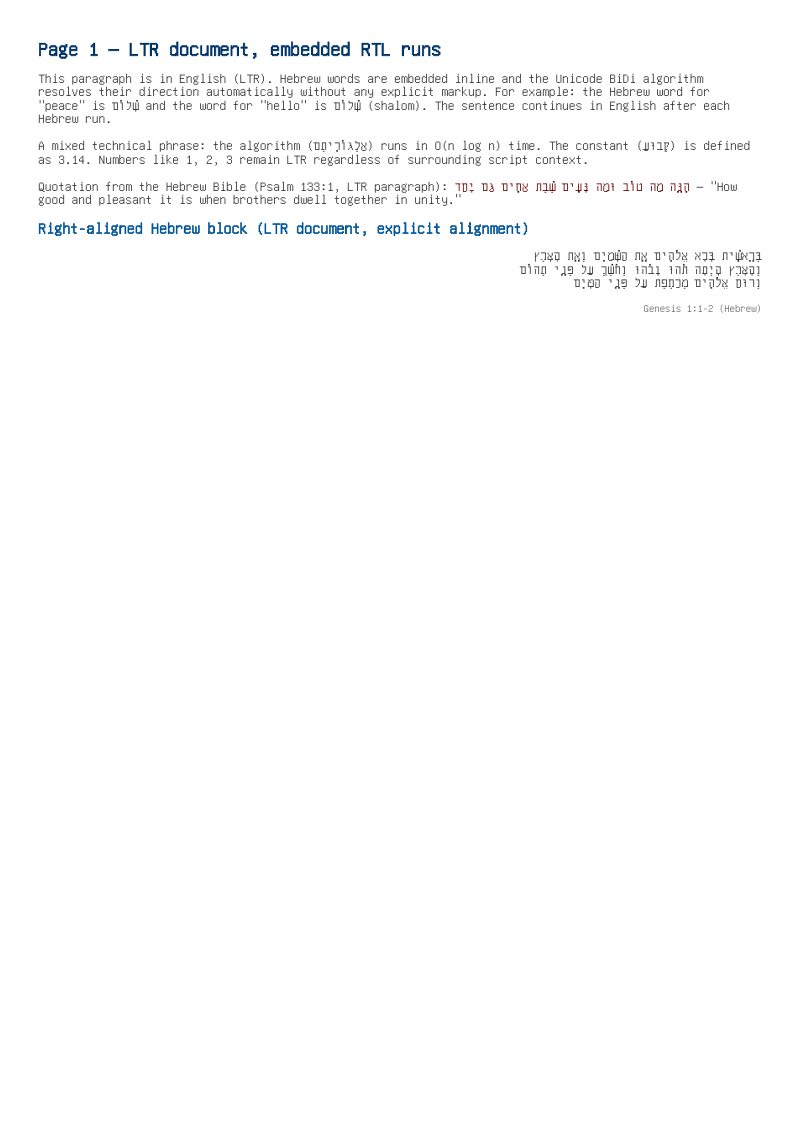
Hebrew, Arabic, and Latin runs in the same paragraph, resolved by the Unicode Bidirectional Algorithm.
- Rendered PDF: E062_bidi_mixed_rtl_ltr.pdf
- PHP source: E062_bidi_mixed_rtl_ltr.phps
- All examples: /examples/
- Category: Multilingual Text
Source Code
<?php

declare(strict_types=1);

/**
 * E062_bidi_mixed_rtl_ltr.php
 *
 * @since       2026-05-01
 * @category    Library
 * @package     Pdf
 * @author      Nicola Asuni <info@tecnick.com>
 * @copyright   2002-2026 Nicola Asuni - Tecnick.com LTD
 * @license     https://www.gnu.org/copyleft/lesser.html GNU-LGPL v3 (see LICENSE)
 * @link        https://github.com/tecnickcom/tc-lib-pdf
 *
 * This file is part of tc-lib-pdf software library.
 */

// NOTE: local file reads (images, fonts, attachments) are restricted to an allowlist of
// trusted paths that covers this package tree, so run the examples in place. To read assets
// from other locations, list them in the 'allowedPaths' entry of the fileOptions constructor
// parameter (see E047_remote_resources_security.php).

// NOTE: run make fonts in the project root to generate the dependencies and example fonts.

// Unifont covers ~65 000 Unicode glyphs (including per-glyph cbbox data).
// Loading its full metric array exceeds the 128 MB PHP default.
\ini_set('memory_limit', '256M');

// autoloader when using Composer
require __DIR__ . '/../vendor/autoload.php';

// define fonts directory
\define('K_PATH_FONTS', \realpath(__DIR__ . '/../vendor/tecnickcom/tc-lib-pdf-font/target/fonts'));

/**
 * Demonstrate mixed bidirectional (BiDi) text layout using setRTL().
 *
 * tc-lib-pdf supports Unicode BiDi text via tc-lib-unicode.  The document
 * direction is set with setRTL(bool):
 *
 *   setRTL(false) - LTR default (Latin, CJK, etc.)
 *   setRTL(true)  - RTL default (Arabic, Hebrew, Persian, Urdu, etc.)
 *
 * The direction affects:
 *   • Cell and text origin anchoring (LTR: x is left edge; RTL: x is right edge)
 *   • HTML block-level alignment defaults (text-align)
 *   • Cursor advancement direction
 *
 * Within an HTML block the Unicode BiDi algorithm handles inline direction
 * switches automatically for mixed runs (e.g. Hebrew words embedded inside
 * an English sentence or vice-versa).
 *
 * Difference from E003 (pure Arabic/Persian):
 *   E003 uses a pure RTL document with no LTR direction switching.
 *   This example focuses on the MID-DOCUMENT switch between RTL and LTR pages
 *   and on truly mixed paragraphs that contain both Hebrew and Latin text
 *   on the same line, which is common in real-world bilingual publishing.
 *
 * Font note: Unifont contains glyphs for virtually all Unicode scripts and
 * correctly supports BiDi rendering, making it the safest choice for
 * multilingual examples.
 */

$pdf = new \Com\Tecnick\Pdf\Tcpdf(
    unit: \Com\Tecnick\Pdf\Page\Unit::Millimeter,
    isunicode: true,
    subsetfont: false,
    compress: true,
    mode: \Com\Tecnick\Pdf\PdfConformance::None,
    objEncrypt: null,
);

$pdf->setCreator('tc-lib-pdf');
$pdf->setAuthor('Nicola Asuni');
$pdf->setSubject('tc-lib-pdf example: 062');
$pdf->setTitle('Mixed BiDi RTL/LTR Typography');
$pdf->setKeywords('TCPDF tc-lib-pdf example bidi rtl ltr hebrew arabic latin mixed direction');
$pdf->setPDFFilename('E062_bidi_mixed_rtl_ltr.pdf');

$pdf->setViewerPreferences(['DisplayDocTitle' => true]);

$pdf->enableDefaultPageContent(false);

// Unifont - comprehensive Unicode coverage including Hebrew
$bfont = $pdf->font->insert($pdf->pon, 'unifont', '', 12);

// ===================================================================
// Page 1 - LTR document with embedded RTL runs
// ===================================================================
$pdf->setRTL(false); // default: LTR
$page1 = $pdf->addPage();
$pdf->page->addContent($bfont['out']);

$html1 = <<<'HTML'
    <h1 style="font-size:15pt; color:#003366;">Page 1 — LTR document, embedded RTL runs</h1>

    <p style="font-size:10pt; color:#333333;">
    This paragraph is in English (LTR).  Hebrew words are embedded inline and the
    Unicode BiDi algorithm resolves their direction automatically without any
    explicit markup.  For example: the Hebrew word for "peace" is שָׁלוֹם and the
    word for "hello" is שָׁלוֹם (shalom).  The sentence continues in English after
    each Hebrew run.
    </p>

    <p style="font-size:10pt; color:#333333;">
    A mixed technical phrase: the algorithm (אַלְגּוֹרִיתְם) runs in
    O(n log n) time.  The constant (קְבוּעַ) is defined as 3.14.
    Numbers like 1, 2, 3 remain LTR regardless of surrounding script context.
    </p>

    <p style="font-size:10pt; color:#333333;">
    Quotation from the Hebrew Bible (Psalm 133:1, LTR paragraph):
    <span style="color:#660000;">הִנֵּה מַה טוֹב וּמַה נָּעִים שֶׁבֶת אַחִים גַּם יָחַד</span>
    — "How good and pleasant it is when brothers dwell together in unity."
    </p>

    <h2 style="font-size:12pt; color:#005599;">Right-aligned Hebrew block (LTR document, explicit alignment)</h2>
    <p style="font-size:10pt; text-align:right; color:#333333;">
    בְּרֵאשִׁית בָּרָא אֱלֹהִים אֵת הַשָּׁמַיִם וְאֵת הָאָרֶץ<br />
    וְהָאָרֶץ הָיְתָה תֹהוּ וָבֹהוּ וְחֹשֶׁךְ עַל פְּנֵי תְהוֹם<br />
    וְרוּחַ אֱלֹהִים מְרַחֶפֶת עַל פְּנֵי הַמָּיִם
    </p>
    <p style="font-size:8pt; color:#666666; text-align:right;">Genesis 1:1-2 (Hebrew)</p>
    HTML;

$pdf->addHTMLCell(html: $html1, posx: 10, posy: 10, width: 190);

// ===================================================================
// Page 2 - RTL document with embedded LTR runs
// ===================================================================
$pdf->setRTL(true); // switch to RTL for this page
$page2 = $pdf->addPage();
$pdf->page->addContent($bfont['out']);

$html2 = <<<'HTML'
    <h1 style="font-size:15pt; color:#003366;">עמוד 2 — מסמך RTL עם רצפי LTR</h1>

    <p style="font-size:10pt; color:#333333; text-align:right;">
    פסקה זו נכתבת בעברית (RTL).  מונחים אנגליים כגון <span dir="ltr">Unicode BiDi</span>
    ו-<span dir="ltr">tc-lib-pdf</span> מוטמעים בשורה, ואלגוריתם ה-BiDi מטפל בכיוונם
    אוטומטית.  המשפט ממשיך בעברית לאחר כל רצף אנגלי.
    </p>

    <p style="font-size:10pt; color:#333333; text-align:right;">
    ניתן לשלב מספרים כגון 42, 3.14 ו-100% בתוך טקסט עברי ללא
    סימון מיוחד.  הם מוצגים בסדר קריאה נכון בהקשרם.
    </p>

    <p style="font-size:10pt; color:#333333; text-align:right;">
    משפט טכני מעורב: הפונקציה
    <span dir="ltr" style="color:#0000aa; font-weight:bold;">setRTL(true)</span>
    מגדירה את כיוון מסמך ברירת המחדל ל-RTL.  ניתן להחליף כיוון
    בכל עמוד על ידי קריאה ל-<span dir="ltr" style="color:#0000aa;">setRTL(false)</span>
    לפני <span dir="ltr" style="color:#0000aa;">addPage()</span>.
    </p>
    HTML;

$pdf->addHTMLCell(html: $html2, posx: 10, posy: 10, width: 190);

// ===================================================================
// Page 3 - Back to LTR: summary and guidance
// ===================================================================
$pdf->setRTL(false); // back to LTR
$page3 = $pdf->addPage();
$pdf->page->addContent($bfont['out']);

$html3 = <<<'HTML'
    <h1 style="font-size:15pt; color:#003366;">Page 3 — Summary and Guidance</h1>

    <h2 style="font-size:12pt; color:#005599;">setRTL() scope</h2>
    <p style="font-size:9pt; color:#333333;">
    <code>setRTL()</code> sets the default document direction.  Call it <b>before</b>
    <code>addPage()</code> to apply the direction to the new page context.  Changing
    direction mid-page is possible but affects all subsequent cell-placement calls on
    that page.
    </p>

    <h2 style="font-size:12pt; color:#005599;">Inline BiDi — no markup needed</h2>
    <p style="font-size:9pt; color:#333333;">
    The Unicode BiDi algorithm (UAX #9) handles inline direction switches
    automatically.  You do not need explicit <code>dir="rtl"</code> or
    <code>dir="ltr"</code> attributes for most runs — the script category of each
    character determines its display direction.  Use explicit <code>dir</code>
    only when the context-based algorithm would resolve the direction incorrectly
    (e.g. punctuation adjacent to a direction boundary).
    </p>

    <h2 style="font-size:12pt; color:#005599;">Font coverage</h2>
    <p style="font-size:9pt; color:#333333;">
    This example uses <b>Unifont</b>, which covers virtually all Unicode blocks
    including Hebrew, Arabic, Devanagari, CJK, and Latin.  For production use,
    consider a font with better kerning and glyph quality for your primary script
    (DejaVu Sans for Latin+Hebrew, Noto fonts for full multilingual coverage).
    </p>

    <h2 style="font-size:12pt; color:#005599;">Pure RTL scripts — see also</h2>
    <p style="font-size:9pt; color:#333333;">
    For documents that are entirely in Arabic or Persian (no mixed LTR content)
    see <b>E003_persian_arabic.php</b>, which demonstrates <code>setRTL(false)</code>
    (the document is LTR but the HTML content uses <code>text-align:right</code>
    combined with Unicode RTL codepoints).
    </p>
    HTML;

$pdf->addHTMLCell(html: $html3, posx: 10, posy: 10, width: 190);

$rawpdf = $pdf->getOutPDFString();
$pdf->renderPDF(rawpdf: $rawpdf);