
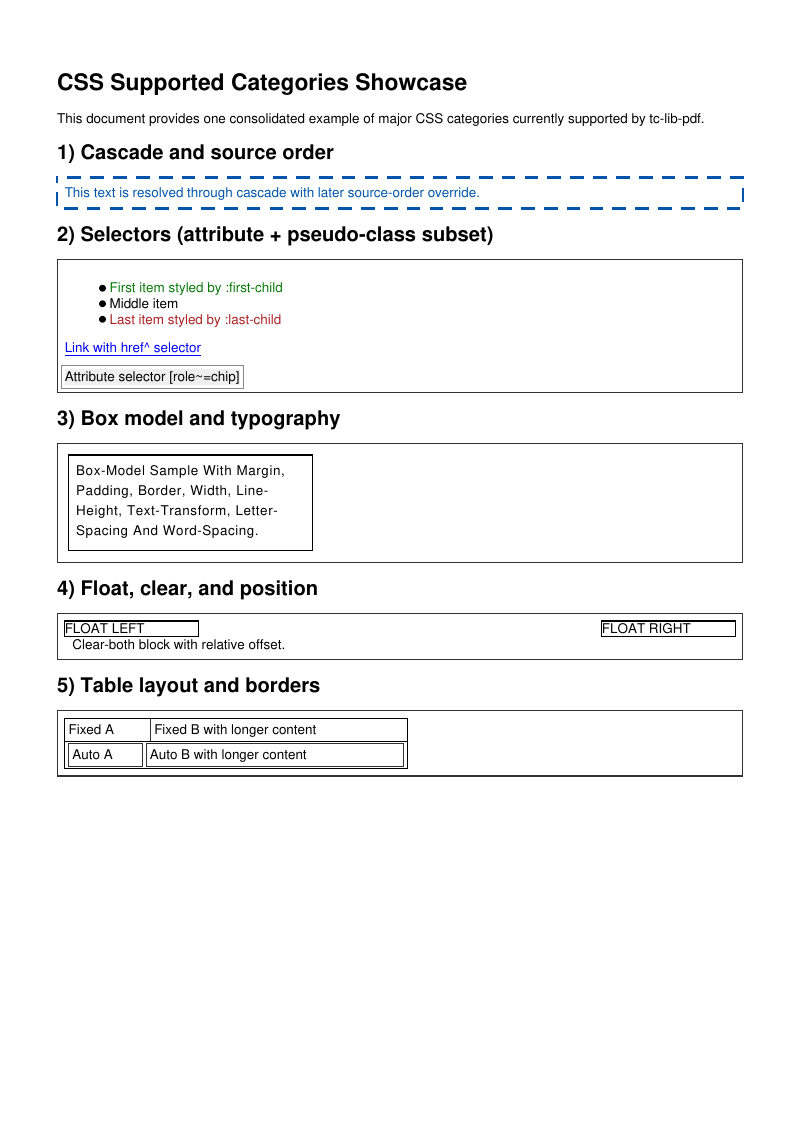
The supported CSS categories, enumerated in the source and rendered by the engine itself, including the global stylesheet set through setGlobalCSS().
- Rendered PDF: E073_css_supported_categories.pdf
- PHP source: E073_css_supported_categories.phps
- All examples: /examples/
- Category: HTML and CSS
- Guide: HTML and CSS
Source Code
<?php
declare(strict_types=1);
/**
* E073_css_supported_categories.php
*
* Demonstrates the major CSS feature categories supported by tc-lib-pdf,
* including table/float/clear interaction, CSS shorthand inherit propagation,
* fieldset and inline-block element styling, overflow-wrap, complex
* CSS selector combinators, and a global base stylesheet registered once via
* setGlobalCSS() and injected into every HTML rendering call.
*
* @since 2026-05-08
* @category Library
* @package Pdf
* @author Nicola Asuni <info@tecnick.com>
* @copyright 2002-2026 Nicola Asuni - Tecnick.com LTD
* @license https://www.gnu.org/copyleft/lesser.html GNU-LGPL v3 (see LICENSE)
* @link https://github.com/tecnickcom/tc-lib-pdf
*
* This file is part of tc-lib-pdf software library.
*/
// NOTE: local file reads (images, fonts, attachments) are restricted to an allowlist of
// trusted paths that covers this package tree, so run the examples in place. To read assets
// from other locations, list them in the 'allowedPaths' entry of the fileOptions constructor
// parameter (see E047_remote_resources_security.php).
// NOTE: run make fonts in the project root to generate the dependencies and example fonts.
// autoloader when using Composer
require __DIR__ . '/../vendor/autoload.php';
// define fonts directory
\define('K_PATH_FONTS', \realpath(__DIR__ . '/../vendor/tecnickcom/tc-lib-pdf-font/target/fonts'));
$pdf = new \Com\Tecnick\Pdf\Tcpdf();
$pdf->setCreator('tc-lib-pdf');
$pdf->setAuthor('Nicola Asuni');
$pdf->setSubject('tc-lib-pdf example: 073');
$pdf->setTitle('CSS Supported Categories');
$pdf->setKeywords('TCPDF tc-lib-pdf example CSS');
$pdf->setPDFFilename('073_css_supported_categories.pdf');
$pdf->font->insert($pdf->pon, 'courier', '', 11);
$bfont = $pdf->font->insert($pdf->pon, 'helvetica', '', 11);
// The HTML continues from the top margin on the pages added by page breaks.
$pdf->addPage([
'margin' => [
'PT' => 15,
'PB' => 15,
'CT' => 15,
'CB' => 15,
],
]);
$pdf->page->addContent($bfont['out']);
$html = <<<HTML
<style>
@media all {
body { font-family: helvetica; font-size: 10pt; }
.panel { margin: 2mm 0; padding: 2mm; border: 0.3mm solid #333; }
/* Cascade and source order */
.cascade-color { color: #cc0000; border: 0.3mm solid #888; }
.cascade-color { color: #0055aa; border: 0.6mm dashed #0055aa; }
/* Selectors */
#selectors li:first-child { color: #0a7a0a; }
#selectors li:last-child { color: #aa2222; }
#selectors a[href^="https"] { text-decoration: underline; }
[role~="chip"] { background-color: #efefef; padding: 1mm; border: 0.2mm solid #888; }
/* Box and typography */
.box { margin: 1mm; padding: 2mm; border: 0.3mm solid #000; width: 60mm; }
.typo { line-height: 150%; text-transform: capitalize; letter-spacing: 0.15mm; word-spacing: 0.25mm; }
/* Floats / clear / position */
.float-left { float: left; width: 35mm; border: 0.3mm solid #000; }
.float-right { float: right; width: 35mm; border: 0.3mm solid #000; }
.clear-both { clear: both; }
.pos-rel { position: relative; left: 2mm; }
/* Tables */
.tbl-fixed { width: 90mm; table-layout: fixed; border-collapse: collapse; border: 0.3mm solid #000; }
.tbl-auto { width: 90mm; table-layout: auto; border-collapse: separate; border-spacing: 1mm 0.5mm; border: 0.3mm solid #000; }
.tbl-fixed td, .tbl-auto td { border: 0.2mm solid #333; padding: 1mm; }
/* Paged media */
.page-break { page-break-before: always; }
.avoid-break { page-break-inside: avoid; }
}
@media print {
.print-only { font-weight: bold; }
}
</style>
<h1>CSS Supported Categories Showcase</h1>
<p>This document provides one consolidated example of major CSS categories currently supported by tc-lib-pdf.</p>
<h2>1) Cascade and source order</h2>
<div class="panel cascade-color">This text is resolved through cascade with later source-order override.</div>
<h2>2) Selectors (attribute + pseudo-class subset)</h2>
<div id="selectors" class="panel">
<ul>
<li>First item styled by :first-child</li>
<li>Middle item</li>
<li>Last item styled by :last-child</li>
</ul>
<p><a href="https://example.com">Link with href^ selector</a></p>
<span role="tag chip">Attribute selector [role~=chip]</span>
</div>
<h2>3) Box model and typography</h2>
<div class="panel">
<div class="box typo">box-model sample with margin, padding, border, width, line-height, text-transform, letter-spacing and word-spacing.</div>
</div>
<h2>4) Float, clear, and position</h2>
<div class="panel avoid-break">
<div class="float-left">FLOAT LEFT</div>
<div class="float-right">FLOAT RIGHT</div>
<div class="clear-both pos-rel">Clear-both block with relative offset.</div>
</div>
<h2>5) Table layout and borders</h2>
<div class="panel">
<table class="tbl-fixed">
<tr><td width="25%">Fixed A</td><td width="75%">Fixed B with longer content</td></tr>
</table>
<table class="tbl-auto">
<tr><td>Auto A</td><td>Auto B with longer content</td></tr>
</table>
</div>
<div class="page-break"></div>
<h2>6) Paged media aliases and print media</h2>
<div class="panel print-only">This block is inside @media print and uses page-break-before for explicit pagination.</div>
<p>End of CSS category showcase.</p>
<div class="page-break"></div>
<h2>7) Table, Float, and Clear Interaction</h2>
<p>Two floated KPI boxes followed by a clear:both div and a full-width table.
The table begins below the floats at full available width.</p>
<style>
.kpi-box { float: left; width: 44%; margin-right: 4%; padding: 3pt;
border: 0.4pt solid #9db0c1; background: #f4f8fb; }
.kpi-box h3 { margin: 0 0 2pt 0; font-size: 10pt; }
.kpi-clear { clear: both; height: 0; line-height: 0; }
.kpi-table { width: 100%; border-collapse: collapse; margin-top: 4pt; }
.kpi-table th, .kpi-table td { border: 0.4pt solid #95a8ba; padding: 2pt; font-size: 9pt; }
.kpi-table th { background: #e4edf5; }
</style>
<div class="kpi-box"><h3>Uptime</h3><p style="margin:0;">99.92%</p></div>
<div class="kpi-box"><h3>Alerts</h3><p style="margin:0;">17 open, 4 critical</p></div>
<div class="kpi-clear"></div>
<table class="kpi-table">
<tr><th>Service</th><th>Latency P95</th><th>Error Rate</th><th>Status</th></tr>
<tr><td>Gateway</td><td>238ms</td><td>0.4%</td><td>Degraded</td></tr>
<tr><td>Billing</td><td>122ms</td><td>0.1%</td><td>Healthy</td></tr>
</table>
<h2>8) CSS Shorthand inherit Keyword</h2>
<p>Shorthand properties (margin, padding, border, background, list-style)
propagate the inherit keyword to each decomposed longhand.</p>
<style>
.inherit-parent { margin: 3pt; padding: 4pt; border: 0.4pt solid #336699;
background: #eef3fb; color: #1a3558; }
.inherit-child-margin { margin: inherit; background: #ddeeff; padding: 2pt; }
.inherit-child-padding { padding: inherit; border: inherit; background: #d4f0d4; }
.inherit-list-parent { list-style: disc inside; color: #553300; }
.inherit-list-child { list-style: inherit; margin-left: 5mm; }
</style>
<div class="inherit-parent">
Parent: margin 3pt, padding 4pt, border blue, background #eef3fb.
<div class="inherit-child-margin">Child with margin:inherit — same outer spacing as parent.</div>
<div class="inherit-child-padding">Child with padding:inherit and border:inherit — matches parent box insets.</div>
</div>
<ul class="inherit-list-parent">
<li>Parent list (disc, inside)</li>
<li><ul class="inherit-list-child"><li>Child with list-style:inherit — disc inside preserved.</li></ul></li>
</ul>
<h2>9) Fieldset, Legend, and Inline-Block Styling</h2>
<p>Structural styles on fieldset-like containers, legend labels, and inline-block spans.
Note: interactive pseudo-states (:hover, :focus) are not applicable in static PDF output.</p>
<style>
.demo-fieldset { border: 0.4pt solid #9ea7b3; margin: 0 0 4pt 0; padding: 4pt; }
.demo-legend { font-weight: bold; font-size: 9pt; }
.demo-label { display: inline-block; width: 80pt; font-weight: bold; color: #333; }
.demo-input { display: inline-block; border: 0.4pt solid #b9c1cb; padding: 1pt 3pt;
width: 160pt; background: #fafbfc; }
.demo-help { color: #53606f; font-size: 8pt; margin-top: 2pt; }
</style>
<div class="demo-fieldset">
<span class="demo-legend">Account Details</span>
<div><span class="demo-label">Full name</span><span class="demo-input">Jane Example</span></div>
<div><span class="demo-label">Email</span><span class="demo-input">jane@example.test</span></div>
<p class="demo-help">Note: interactive states (:focus, :hover) are not applicable to static PDF output.</p>
</div>
<h2>10) Overflow-Wrap and Complex Selector Combinators</h2>
<p>Long unbreakable words in narrow containers with overflow-wrap; child (>), adjacent (+), and general sibling (~) combinators.</p>
<style>
.overflow-box { width: 70mm; border: 0.4pt solid #aaa; padding: 2pt; overflow-wrap: break-word; word-break: break-word; }
.combo-parent > p { color: #004488; }
.combo-parent > p + span { font-style: italic; }
.combo-parent > p ~ span { text-decoration: underline; }
</style>
<div class="overflow-box">
Shortword and <code>verylongunbreakableidentifier_thatcouldcauseoverflowInNarrowColumns</code> handled.
</div>
<div class="combo-parent">
<p>Direct child paragraph (color #004488 via > combinator).</p>
<span>Adjacent sibling span (italic via p + span).</span>
<span>General sibling span (underline via p ~ span).</span>
</div>
<div class="page-break"></div>
<h2>11) Admin Float + Table Clearance</h2>
<p>The table top border must start below the dotted guide and below both KPI cards, without touching or overlapping card borders.</p>
<style>
.tracker-wrap { border: 0.4pt solid #a6b3bf; padding: 6pt; background: #fbfcfd; }
.tracker-kpi { float: left; width: 48%; margin-right: 2%; padding: 6pt;
border: 0.5pt solid #9db0c1; background: #f4f8fb; }
.tracker-kpi-last { margin-right: 0; }
.tracker-kpi h3 { margin: 0 0 4pt 0; font-size: 11pt; }
.tracker-clear { clear: both; height: 0; line-height: 0; }
.tracker-guide { margin-top: 4pt; border-top: 0.6pt dotted #d66; color: #a33; font-size: 8pt; }
.tracker-table { width: 100%; border-collapse: collapse; margin-top: 8pt; }
.tracker-table th, .tracker-table td { border: 0.5pt solid #95a8ba; padding: 3pt; }
.tracker-table th { background: #e4edf5; }
</style>
<div class="tracker-wrap">
<div class="tracker-kpi"><h3>Uptime</h3><p style="margin:0;">99.92% this month</p></div>
<div class="tracker-kpi tracker-kpi-last"><h3>Alerts</h3><p style="margin:0;">17 open, 4 critical</p></div>
<div class="tracker-clear"></div>
<div class="tracker-guide">Guide: table must begin below this line.</div>
<table class="tracker-table">
<tr><th>Service</th><th>Latency P95</th><th>Error Rate</th><th>Status</th></tr>
<tr><td>Gateway</td><td>238ms</td><td>0.4%</td><td>Degraded</td></tr>
<tr><td>Billing</td><td>122ms</td><td>0.1%</td><td>Healthy</td></tr>
<tr><td>Notifications</td><td>305ms</td><td>0.8%</td><td>Warning</td></tr>
<tr><td>Search</td><td>188ms</td><td>0.2%</td><td>Healthy</td></tr>
</table>
</div>
<div class="page-break"></div>
<h2>12) Font Shorthand Parsing and Inherit</h2>
<p>This section showcases the newly added support for mapping CSS <code>font</code> shorthand
to longhands and propagating <code>font: inherit</code> to child elements.</p>
<style>
.font-demo-wrap { border: 0.4pt solid #9aa6b2; padding: 6pt; background: #fbfcff; }
.font-explicit {
font: italic 700 14pt/1.5 "Times New Roman", serif;
color: #1f3d5a;
margin-bottom: 5pt;
}
.font-explicit code {
font: normal 400 9pt/1.2 courier;
color: #5b2d00;
}
.font-inherit-parent {
font: oblique 600 12pt/1.4 helvetica;
background: #f0f6fb;
border: 0.4pt solid #9db4c9;
padding: 4pt;
margin-bottom: 5pt;
}
.font-inherit-child {
font: inherit;
border: 0.4pt dashed #aac0d5;
padding: 3pt;
margin-top: 3pt;
}
.font-shorthand-plus-longhand {
font: italic 700 13pt/1.4 "Times New Roman", serif;
font-style: normal;
border: 0.4pt solid #c2c2c2;
padding: 3pt;
}
</style>
<div class="font-demo-wrap">
<div class="font-explicit">
Explicit shorthand: <strong>italic + bold + 14pt + line-height 1.5 + Times family</strong>.
<br /><code>font: italic 700 14pt/1.5 "Times New Roman", serif;</code>
</div>
<div class="font-inherit-parent">
Parent uses shorthand font definition (oblique, semi-bold, 12pt, line-height 1.4).
<div class="font-inherit-child">
Child uses <code>font: inherit</code> and should visually match the parent font settings.
</div>
</div>
<div class="font-shorthand-plus-longhand">
Shorthand + explicit longhand override: italic from shorthand is overridden by
<code>font-style: normal</code>, while weight/size/family from shorthand remain.
</div>
</div>
<div class="page-break"></div>
<h2>13) Form Control CSS to Widget Mapping</h2>
<p>This section demonstrates static style mapping from CSS to AcroForm widgets:
background color, border color/width/style, and text alignment.</p>
<style>
.form-grid { border: 0.4pt solid #b0bac6; background: #f8fafc; padding: 6pt; }
.form-row { margin-bottom: 5pt; }
.form-label { display: inline-block; width: 95pt; font-weight: bold; color: #34495e; }
.ctl-text {
width: 180pt;
border: 0.8pt dashed #3a6ea5;
background: #eaf3ff;
color: #123d66;
text-align: center;
}
.ctl-number {
width: 120pt;
border: 0.8pt solid #6a8f44;
background: #f2faea;
color: #2e4f1d;
}
.ctl-select {
width: 180pt;
border: 0.8pt solid #8e44ad;
background: #f6ebfb;
color: #4c1f61;
}
.ctl-textarea {
width: 180pt;
border: 0.8pt solid #c57b1d;
background: #fff7e8;
color: #6f3d00;
}
.ctl-button {
width: 95pt;
border: 0.8pt solid #7f8c8d;
background: #eef1f2;
color: #2f3a3b;
}
</style>
<div class="form-grid">
<div class="form-row">
<span class="form-label">Styled text input</span>
<input class="ctl-text" type="text" name="demo_text" value="Centered text" />
</div>
<div class="form-row">
<span class="form-label">Styled number input</span>
<input class="ctl-number" type="number" name="demo_num" value="12345" />
</div>
<div class="form-row">
<span class="form-label">Styled select</span>
<select class="ctl-select" name="demo_plan">
<option value="starter">Starter</option>
<option value="pro" selected="selected">Professional</option>
<option value="ent">Enterprise</option>
</select>
</div>
<div class="form-row">
<span class="form-label">Styled textarea</span>
<textarea class="ctl-textarea" name="demo_notes" rows="3" cols="26">Multiline notes example</textarea>
</div>
<div class="form-row">
<span class="form-label">Styled button</span>
<input class="ctl-button" type="button" name="demo_btn" value="Action" />
</div>
</div>
<div class="page-break"></div>
<h2>14) Shorthand Normalization Edge Cases</h2>
<p>This section tests shorthand CSS normalization patterns that occur in real-world documents,
ensuring margin, padding, border and background properties are properly expanded to longhands.</p>
<style>
.edge-case { margin: 3mm 0 3mm 0; padding: 2mm; border: 0.3mm solid #333; margin-bottom: 2mm; }
.edge-single { margin: 0; padding: 3pt; border: 0.2mm dotted #666; }
.edge-four-value { margin-top: 2pt; margin-right: 4pt; margin-bottom: 2pt; margin-left: 4pt; }
.edge-border-shorthand { border: 0.5pt solid #999; padding: 4pt; }
.edge-background-single { background: #f0f0f0; padding: 3pt; }
</style>
<div class="edge-case">
<strong>Case 1: Four-value margin</strong>
<code>margin: 3mm 0 3mm 0;</code>
This should expand to T=3mm, R=0, B=3mm, L=0. The box should have vertical margins but no horizontal margins.
</div>
<div class="edge-single">
<strong>Case 2: Single-value shorthand</strong>
<code>margin: 0; padding: 3pt;</code>
All sides should be 0 for margin, 3pt for padding.
</div>
<div class="edge-four-value">
<strong>Case 3: Individual longhand properties</strong>
<code>margin-top: 2pt; margin-right: 4pt; margin-bottom: 2pt; margin-left: 4pt;</code>
Should render with alternating 2pt/4pt margins (simulating different rhythms).
</div>
<div class="edge-border-shorthand">
<strong>Case 4: Border shorthand expansion</strong>
<code>border: 0.5pt solid #999; padding: 4pt;</code>
All four border sides should be solid, 0.5pt width, #999 color. Padding should be 4pt on all sides.
</div>
<div class="edge-background-single">
<strong>Case 5: Single-value background</strong>
<code>background: #f0f0f0;</code>
Background color should be light gray across the entire box.
</div>
<div class="page-break"></div>
<h2>15) Invoice-Style Shorthand Patterns</h2>
<p>This section replicates the CSS patterns from the real-world invoice_statement test case to verify
that all shorthand normalization edge cases render correctly.</p>
<style>
.inv-header { border-bottom: 1pt solid #444; margin-bottom: 8pt; padding-bottom: 4pt; }
.inv-meta { float: right; text-align: right; }
.inv-clear { clear: both; height: 0; line-height: 0; }
.inv-table { width: 100%; border-collapse: collapse; }
.inv-table th, .inv-table td { border: 0.5pt solid #999; padding: 4pt; }
.inv-total { font-weight: bold; background: #f0f0f0; }
</style>
<div class="inv-header">
<div class="inv-meta">Invoice #INV-2048<br/>Date: 2026-05-10</div>
<h3 style="margin: 0; font-size: 12pt;">Blue Finch Supply</h3>
<p style="margin: 2pt 0 0 0;">Monthly service statement</p>
</div>
<div class="inv-clear"></div>
<table class="inv-table">
<tr><th>Description</th><th>Qty</th><th>Unit Price</th><th>Amount</th></tr>
<tr><td>Monitoring subscription</td><td>1</td><td>49.00</td><td>49.00</td></tr>
<tr><td>Priority support</td><td>2</td><td>15.00</td><td>30.00</td></tr>
<tr class="inv-total"><td colspan="3">Total</td><td>79.00</td></tr>
</table>
<p style="margin-top: 4pt; font-size: 9pt; color: #666;">
Visual targets: header separator, float-right metadata, clear-both handoff before table,
collapsed table borders, total-row shorthand background, plus margin/padding shorthand values.
</p>
<div class="page-break"></div>
<h2>16) Non-Font Shorthand Expansion Checks</h2>
<p>This section isolates non-font shorthand properties that can be normalized conservatively in invoice-like pages.
It helps visually verify border-color/style/width and background shorthands without engine workarounds.</p>
<style>
.nf-grid { border: 0.4pt solid #a8b3be; padding: 5pt; background: #fbfdff; }
.nf-case { margin-bottom: 6pt; padding: 4pt; border: 0.4pt solid #aab5c2; }
.nf-border-color {
border-style: solid;
border-width: 1pt;
border-color: #cc0000 #0077cc #228b22 #a35f00;
}
.nf-border-style {
border-width: 1pt;
border-style: dotted dashed solid double;
border-color: #666;
}
.nf-border-width {
border-style: solid;
border-width: 0.5pt 1.2pt 2pt 3pt;
border-color: #444;
}
.nf-border-mixed {
border-top: 2pt solid #004f9f;
border-right: 1pt dashed #2f8f2f;
border-bottom: 1.5pt dotted #9c3f00;
border-left: 0.7pt solid #555;
background: #f6f8fa;
}
.nf-bg-hex { background: #f0f0f0; }
.nf-bg-name { background: silver; }
</style>
<div class="nf-grid">
<div class="nf-case nf-border-color">
<strong>Case A: border-color 4-values</strong>
<code>border-color: #cc0000 #0077cc #228b22 #a35f00;</code>
Top/right/bottom/left borders should show distinct colors.
</div>
<div class="nf-case nf-border-style">
<strong>Case B: border-style 4-values</strong>
<code>border-style: dotted dashed solid double;</code>
Border pattern should vary by side.
</div>
<div class="nf-case nf-border-width">
<strong>Case C: border-width 4-values</strong>
<code>border-width: 0.5pt 1.2pt 2pt 3pt;</code>
Border thickness should visibly differ by side.
</div>
<div class="nf-case nf-border-mixed">
<strong>Case D: per-side border shorthand</strong>
<code>border-top/right/bottom/left: ...</code>
Each side should preserve its own width/style/color tuple.
</div>
<div class="nf-case nf-bg-hex">
<strong>Case E: background shorthand (hex color)</strong>
<code>background: #f0f0f0;</code>
Block should render with a light gray fill.
</div>
<div class="nf-case nf-bg-name">
<strong>Case F: background shorthand (named color)</strong>
<code>background: silver;</code>
Block should render with named color fill.
</div>
</div>
<div class="page-break"></div>
<h2>17) Non-Font Shorthand Stress Cases</h2>
<p>This section focuses on shorthand combinations that are often normalized conservatively in static PDF renderers.
The primary target here is complex <code>background</code> shorthand token ordering and mixed token sets.</p>
<style>
.nf2-wrap { border: 0.4pt solid #9fb0be; padding: 5pt; background: #fcfdff; }
.nf2-case { margin-bottom: 6pt; padding: 4pt; border: 0.4pt solid #a6b2bf; }
.nf2-bg-order-a { background: #e8f2ff no-repeat left top; }
.nf2-bg-order-b { background: no-repeat right top #ffeedd; }
.nf2-bg-order-c { background: left bottom #eaf9ea no-repeat; }
.nf2-bg-with-image-token { background: #f5eefc url("missing-resource.png") no-repeat center top; }
.nf2-bg-transparent { background: transparent; }
.nf2-margin-pad-a { margin: 2pt 8pt; padding: 1pt 3pt 5pt; }
.nf2-margin-pad-b { margin: 4pt 2pt 1pt; padding: 2pt; }
</style>
<div class="nf2-wrap">
<div class="nf2-case nf2-bg-order-a">
<strong>Case A: background order (color first)</strong>
<code>background: #e8f2ff no-repeat left top;</code>
Expect light blue fill.
</div>
<div class="nf2-case nf2-bg-order-b">
<strong>Case B: background order (color last)</strong>
<code>background: no-repeat right top #ffeedd;</code>
Expect peach fill.
</div>
<div class="nf2-case nf2-bg-order-c">
<strong>Case C: background order (position first)</strong>
<code>background: left bottom #eaf9ea no-repeat;</code>
Expect pale green fill.
</div>
<div class="nf2-case nf2-bg-with-image-token">
<strong>Case D: background with image token</strong>
<code>background: #f5eefc url("missing-resource.png") no-repeat center top;</code>
Even if image token is ignored, fallback lavender color should still fill the block.
</div>
<div class="nf2-case nf2-bg-transparent">
<strong>Case E: transparent background</strong>
<code>background: transparent;</code>
Should not paint an opaque fill.
</div>
<div class="nf2-case nf2-margin-pad-a">
<strong>Case F: mixed margin/padding shorthand (2 + 3 values)</strong>
<code>margin: 2pt 8pt; padding: 1pt 3pt 5pt;</code>
Horizontal margins should be wider than vertical, with asymmetric bottom padding.
</div>
<div class="nf2-case nf2-margin-pad-b">
<strong>Case G: mixed margin/padding shorthand (3 + 1 values)</strong>
<code>margin: 4pt 2pt 1pt; padding: 2pt;</code>
Top margin should be largest; padding should be uniform.
</div>
</div>
<div class="page-break"></div>
<h2>18) Shorthand vs Longhand Override Order</h2>
<p>This section checks cascade order interactions where shorthand and matching longhands appear
in different declaration orders. Later declarations should win.</p>
<style>
.ord-wrap { border: 0.4pt solid #9eacb8; padding: 5pt; background: #fcfdff; }
.ord-case { margin-bottom: 6pt; padding: 4pt; border: 0.4pt solid #a9b5c1; }
.ord-bg-longhand-wins {
background: #ddeeff;
background-color: #ffe6e6;
}
.ord-bg-shorthand-wins {
background-color: #ffe6e6;
background: #ddeeff;
}
.ord-border-width-longhand-wins {
border: 0.6pt solid #446;
border-left-width: 3pt;
}
.ord-border-width-shorthand-wins {
border-left-width: 3pt;
border: 0.6pt solid #446;
}
.ord-border-color-longhand-wins {
border: 0.8pt solid #999;
border-right-color: #cc0000;
}
.ord-border-color-shorthand-wins {
border-right-color: #cc0000;
border: 0.8pt solid #999;
}
</style>
<div class="ord-wrap">
<div class="ord-case ord-bg-longhand-wins">
<strong>Case A: background then background-color</strong>
<code>background: #ddeeff; background-color: #ffe6e6;</code>
Expected fill: pink (#ffe6e6).
</div>
<div class="ord-case ord-bg-shorthand-wins">
<strong>Case B: background-color then background</strong>
<code>background-color: #ffe6e6; background: #ddeeff;</code>
Expected fill: light blue (#ddeeff).
</div>
<div class="ord-case ord-border-width-longhand-wins">
<strong>Case C: border then border-left-width</strong>
<code>border: 0.6pt solid #446; border-left-width: 3pt;</code>
Left border should be much thicker than other sides.
</div>
<div class="ord-case ord-border-width-shorthand-wins">
<strong>Case D: border-left-width then border</strong>
<code>border-left-width: 3pt; border: 0.6pt solid #446;</code>
Left border should revert to same thickness as other sides.
</div>
<div class="ord-case ord-border-color-longhand-wins">
<strong>Case E: border then border-right-color</strong>
<code>border: 0.8pt solid #999; border-right-color: #cc0000;</code>
Right border should be red; other sides gray.
</div>
<div class="ord-case ord-border-color-shorthand-wins">
<strong>Case F: border-right-color then border</strong>
<code>border-right-color: #cc0000; border: 0.8pt solid #999;</code>
All sides should be gray (right red override should be overwritten).
</div>
</div>
<div class="page-break"></div>
<h2>19) Form Controls - Interactive State Approximations</h2>
<p>This section demonstrates static PDF approximations of form control interactive states.
Since PDF is a static format, we approximate :hover, :focus, :active using inline styling conventions
(border widening, background shifts, etc.).</p>
<style>
.form-demo { border: 0.4pt solid #bbb; padding: 6pt; background: #fafafa; margin: 4pt 0; }
.form-demo input,
.form-demo textarea,
.form-demo select,
.form-demo button {
font-family: helvetica;
font-size: 9pt;
border: 0.3pt solid #999;
padding: 2pt 3pt;
margin: 2pt 0;
background: white;
}
.form-demo button {
background: #e8e8e8;
border: 0.3pt solid #666;
font-weight: bold;
}
/* Unfocused state (default) */
.form-unfocused {
border: 0.3pt solid #ccc;
background: white;
}
/* Focused state (approximated with darker border + subtle background shift) */
.form-focused {
border: 0.4pt solid #0066cc;
background: #f0f5ff;
}
/* Hover state (for buttons: lighter background, no change to border) */
.form-hover {
background: #d9d9d9;
border: 0.3pt solid #666;
}
/* Active/pressed state (for buttons: darker background, slightly thicker border) */
.form-active {
background: #c0c0c0;
border: 0.4pt solid #333;
}
/* Disabled state */
.form-disabled {
background: #efefef;
color: #999;
border: 0.3pt solid #ddd;
}
</style>
<div class="form-demo">
<strong>Text Input States</strong>
<div>
<p><strong>Unfocused:</strong> <input type="text" class="form-unfocused" value="unfocused input" /></p>
<p><strong>Focused (approximated):</strong> <input type="text" class="form-focused" value="focused input" /></p>
</div>
</div>
<div class="form-demo">
<strong>Textarea States</strong>
<div>
<p><strong>Unfocused:</strong><br /><textarea class="form-unfocused">unfocused textarea with default border</textarea></p>
<p><strong>Focused (approximated):</strong><br /><textarea class="form-focused">focused textarea with blue border and light blue background</textarea></p>
</div>
</div>
<div class="form-demo">
<strong>Button States</strong>
<div>
<p>
<button class="form-unfocused">Default Button</button>
<button class="form-hover">Hover Button</button>
<button class="form-active">Active Button</button>
<button class="form-disabled">Disabled Button</button>
</p>
</div>
</div>
<div class="form-demo">
<strong>Select States</strong>
<div>
<p><strong>Unfocused:</strong> <select class="form-unfocused"><option>Option 1</option><option>Option 2</option></select></p>
<p><strong>Focused (approximated):</strong> <select class="form-focused"><option>Option 1</option><option>Option 2</option></select></p>
</div>
</div>
<p style="font-size: 8pt; color: #666; margin-top: 4pt;">
<em>Note:</em> PDF is a static format and cannot render true interactive states (:hover, :focus, :active).
This section demonstrates recommended visual conventions for approximating these states in static output.
Color shifts (blue border for focus, darker gray for hover/active) provide visual cues to users
that static widget styling is supported, while full interactivity remains a PDF viewer responsibility.
</p>
<div class="page-break"></div>
<h2>20) Pseudo-Class Selector Mapping (Engine Validation)</h2>
<p>This section validates selector-based mapping for interactive/state pseudo-classes in static output.
Expected: the following pseudo selectors are matched by the engine for supported targets:
<code>:hover</code>, <code>:focus</code>, <code>:active</code>, <code>:visited</code>,
<code>:enabled</code>, <code>:disabled</code>, <code>:checked</code>.</p>
<style>
.state-map {
border: 0.4pt solid #aeb7c2;
background: #f9fbfd;
padding: 6pt;
margin: 4pt 0;
}
.state-map .row {
margin-bottom: 3pt;
}
.state-map .lbl {
display: inline-block;
width: 120pt;
font-weight: bold;
}
.state-map input,
.state-map button,
.state-map select,
.state-map a {
font-family: helvetica;
font-size: 9pt;
}
/* Validate interactive pseudo-class selectors on controls/links */
.state-map input.v-hover:hover { border: 0.4pt solid #b25a00; background: #fff0df; }
.state-map input.v-focus:focus { border: 0.4pt solid #005ec4; background: #eaf2ff; }
.state-map button.v-active:active { border: 0.5pt solid #444; background: #cfcfcf; }
.state-map a.v-visited:visited { color: #663399; text-decoration: underline; }
/* Validate state pseudo-class selectors */
.state-map input:enabled { border: 0.35pt solid #2f7d32; background: #edf9ed; }
.state-map input:disabled { border: 0.35pt solid #9b9b9b; background: #eeeeee; color: #8c8c8c; }
.state-map input:checked { outline: 0.45pt solid #0f5fb6; }
</style>
<div class="state-map">
<div class="row">
<span class="lbl">:hover selector</span>
<input type="text" class="v-hover" value="input.v-hover:hover rule" />
</div>
<div class="row">
<span class="lbl">:focus selector</span>
<input type="text" class="v-focus" value="input.v-focus:focus rule" />
</div>
<div class="row">
<span class="lbl">:active selector</span>
<button class="v-active" type="button" value="button.v-active:active rule">button.v-active:active rule</button>
</div>
<div class="row">
<span class="lbl">:visited selector</span>
<a class="v-visited" href="https://example.com/visited">a.v-visited:visited rule</a>
</div>
<div class="row">
<span class="lbl">:enabled selector</span>
<input type="text" value="input:enabled rule" />
</div>
<div class="row">
<span class="lbl">:disabled selector</span>
<input type="text" value="input:disabled rule" disabled="disabled" />
</div>
<div class="row">
<span class="lbl">:checked selector</span>
<input type="checkbox" checked="checked" value="1" /> checked checkbox should show checked styling
</div>
</div>
<p style="font-size: 8pt; color: #666; margin-top: 4pt;">
<em>Validation hint:</em> if this section shows style differences per row,
the pseudo-class selector mapping logic is active in the rendering engine.
</p>
<div class="page-break"></div>
<h2>21) Narrow-Column Long-Token Overflow</h2>
<p>The fixture uses a <code>.note</code> callout box
(left border + tinted background) containing an inline <code><code></code> token with no natural
break points. Three variants are shown side by side.</p>
<style>
/* Reproduce fixture styles exactly */
.ovf-article { font-family: helvetica; font-size: 11pt; line-height: 1.4; color: #1a1a1a; }
.ovf-note {
background: #f4f7fb;
border-left: 3pt solid #2f5a8a;
padding: 6pt;
margin: 8pt 0;
}
.ovf-note code { background: #efefef; padding: 1pt 2pt; }
/* Column wrapper for side-by-side comparison */
.ovf-cols { border: 0.4pt solid #b0bbc8; background: #f8f9fb; padding: 5pt; }
.ovf-col {
width: 55mm;
border: 0.4pt solid #c8d0da;
background: #fff;
padding: 3pt;
margin: 0 3pt 3pt 0;
display: inline-block;
vertical-align: top;
font-size: 9pt;
}
.ovf-col h4 { margin: 0 0 2pt 0; font-size: 8.5pt; color: #2f5a8a; }
/* The fix under test */
.ovf-fix-wrap { overflow-wrap: break-word; word-break: break-word; }
</style>
<div class="ovf-cols">
<div class="ovf-col">
<h4>A) Fixture replica (no fix)</h4>
<div class="ovf-article">
<p class="ovf-note">Known caveat:
<code>very_very_very_very_very_very_very_long_tokens_without_breaks</code>
can exceed narrow columns.
</p>
</div>
</div>
<div class="ovf-col">
<h4>B) With overflow-wrap on note</h4>
<div class="ovf-article">
<p class="ovf-note ovf-fix-wrap">Known caveat:
<code>very_very_very_very_very_very_very_long_tokens_without_breaks</code>
can exceed narrow columns.
</p>
</div>
</div>
<div class="ovf-col">
<h4>C) With overflow-wrap on code</h4>
<div class="ovf-article">
<p class="ovf-note">Known caveat:
<code style="overflow-wrap: break-word; word-break: break-word;">very_very_very_very_very_very_very_long_tokens_without_breaks</code>
can exceed narrow columns.
</p>
</div>
</div>
</div>
<p style="font-size: 8pt; color: #666; margin-top: 3pt;">
<em>Validation hints:</em>
A = current engine output (may overflow right border) |
B = fix applied at paragraph level |
C = fix applied at inline element level.
If A and B/C look identical (no overflow visible), the issue may not be worth fixing.
If A overflows the border, B and C should demonstrate the fix working.
</p>
<div class="page-break"></div>
<h2>22) Complex Selector Coverage (Validated)</h2>
<p>This section exercises complex CSS selector combinations.
Selectors in the <em>Supported</em> column should apply styling visibly.
Selectors in the <em>Extended coverage</em> column should also apply styling visibly.</p>
<style>
/* Fixture layout replica */
.pdoc-hero { background: #eaf2fb; padding: 10pt; border: 0.5pt solid #b7c8dc; margin-bottom: 8pt; }
.pdoc-card { border: 0.5pt solid #bfcbd8; padding: 6pt; margin-bottom: 6pt; }
.pdoc-kv td { padding: 2pt 4pt; border-bottom: 0.5pt solid #d2d8e0; }
/* Selector test wrapper */
.sel-grid { border: 0.4pt solid #b0bbc8; background: #f8f9fb; padding: 5pt; }
.sel-col {
width: 82mm;
border: 0.4pt solid #c8d0da;
background: #fff;
padding: 4pt;
margin: 0 3pt 3pt 0;
display: inline-block;
vertical-align: top;
font-size: 9pt;
}
.sel-col h4 { margin: 0 0 4pt 0; font-size: 8.5pt; color: #2f5a8a; }
.sel-item { margin: 2pt 0; padding: 2pt 3pt; background: #f4f4f4; }
.sel-hit { background: #d4f0d4; color: #1a4d1a; } /* expected to be styled */
/* --- Supported selectors --- */
/* :first-child / :last-child */
.sel-col .sel-list li:first-child { background: #cce5ff; color: #00326d; }
.sel-col .sel-list li:last-child { background: #ffd6d6; color: #6d0000; }
/* Attribute selector [attr^=value] */
.sel-col [data-env^="prod"] { font-weight: bold; color: #1a4d00; }
/* Child combinator > */
.sel-col .sel-parent > .sel-direct { border-left: 2pt solid #0077cc; }
/* Adjacent sibling + */
.sel-col .sel-adj-trigger + .sel-adj-target { color: #8b3a00; font-style: italic; }
/* General sibling ~ */
.sel-col .sel-sib-trigger ~ .sel-sib-target { text-decoration: underline; }
/* --- Extended selector coverage --- */
/* :nth-child() */
.sel-col .sel-list-nth li:nth-child(2) { background: #ffe8a0; color: #5a3a00; }
/* :nth-of-type() */
.sel-col p:nth-of-type(2) { color: #6600aa; }
/* :not() with compound argument */
.sel-col .sel-item:not(.sel-hit) { opacity: 0.55; }
/* Descendant + class + pseudo compound */
.sel-col .sel-parent .sel-child:first-child { color: #cc0000; font-weight: bold; }
</style>
<div class="pdoc-hero">
<h3 style="margin:0 0 3pt 0; font-size:12pt;">API Documentation Bundle</h3>
<p style="margin:0; font-size:9pt;">Fixture replica — product-style landing section.</p>
</div>
<div class="pdoc-card"><strong>Quick Start:</strong> Install, configure, and run your first export.</div>
<div class="pdoc-card"><strong>Compatibility:</strong> CSS 2.1 print-safe subset with documented partials.</div>
<table class="pdoc-kv" style="width:100%;border-collapse:collapse;margin-bottom:8pt;">
<tr><td>Package</td><td>tc-lib-pdf</td></tr>
<tr><td>Runtime</td><td>PHP 8.2+</td></tr>
</table>
<div class="sel-grid">
<div class="sel-col">
<h4>Supported selectors</h4>
<strong style="font-size:8pt;">:first-child / :last-child on li</strong>
<ul class="sel-list" style="margin:2pt 0 5pt 10pt; padding:0;">
<li>Item 1 (blue = :first-child)</li>
<li>Item 2 (unstyled)</li>
<li>Item 3 (red = :last-child)</li>
</ul>
<strong style="font-size:8pt;">[data-env^="prod"] attribute</strong>
<div class="sel-item" data-env="production">data-env="production" (bold green expected)</div>
<div class="sel-item" data-env="staging">data-env="staging" (unstyled)</div>
<strong style="font-size:8pt;">Child combinator ></strong>
<div class="sel-parent">
<div class="sel-direct sel-item">Direct child (blue left border expected)</div>
<div><div class="sel-direct sel-item">Nested (not direct — no extra border)</div></div>
</div>
<strong style="font-size:8pt;">Adjacent sibling +</strong>
<div class="sel-adj-trigger sel-item">Trigger</div>
<div class="sel-adj-target sel-item">Adjacent target (italic orange expected)</div>
<div class="sel-adj-target sel-item">Second sibling (no italic — not adjacent)</div>
<strong style="font-size:8pt;">General sibling ~</strong>
<div class="sel-sib-trigger sel-item">Trigger</div>
<div class="sel-sib-target sel-item">Sibling 1 (underline expected)</div>
<div class="sel-sib-target sel-item">Sibling 2 (underline expected)</div>
</div>
<div class="sel-col">
<h4>Extended selector coverage</h4>
<strong style="font-size:8pt;">:nth-child(2)</strong>
<ul class="sel-list-nth" style="margin:2pt 0 5pt 10pt; padding:0;">
<li>Item 1</li>
<li>Item 2 (yellow highlight expected)</li>
<li>Item 3</li>
</ul>
<strong style="font-size:8pt;">p:nth-of-type(2)</strong>
<p style="margin:1pt 0;">Paragraph 1 (unstyled)</p>
<p style="margin:1pt 0;">Paragraph 2 (purple expected)</p>
<p style="margin:1pt 0;">Paragraph 3 (unstyled)</p>
<strong style="font-size:8pt;">:not(.sel-hit)</strong>
<div class="sel-item">Non-hit item (dimmed expected via :not)</div>
<div class="sel-item sel-hit">Hit item (green fill from .sel-hit)</div>
<strong style="font-size:8pt;">Descendant + class + :first-child compound</strong>
<div class="sel-parent">
<div class="sel-child sel-item">Child 1 (red+bold expected)</div>
<div class="sel-child sel-item">Child 2 (unstyled)</div>
</div>
</div>
</div>
<p style="font-size: 8pt; color: #666; margin-top: 3pt;">
<em>Validation hints (left column):</em> blue/red list items, bold green attribute row, blue-left-border
direct child, italic-orange adjacent sibling, underlined general siblings should all be visible.<br/>
<em>Validation hints (right column):</em> yellow <code>:nth-child(2)</code> list item, purple
<code>p:nth-of-type(2)</code>, dimmed non-hit item via <code>:not(.sel-hit)</code>, and red+bold first
child in the compound selector block should all be visible.
</p>
<strong style="font-size:8pt;">Rules that also match an ancestor</strong>
<style>
.sel-anc td > * { font-size: 7pt; }
.sel-anc .anc-large { font-size: 12pt; }
.sel-anc .anc-big { font-size: 120%; }
.sel-anc .anc-box { margin-left: 5mm; border-left: 1pt solid #2f5a8a; padding-left: 2pt; }
</style>
<div class="sel-anc">
<table border="1" cellpadding="2" style="width:100%;">
<tr><td class="anc-large"><div class="anc-large">Child of a matching cell (12pt expected, not 7pt)</div></td></tr>
</table>
<p class="anc-large" style="margin:1pt 0;">Reference paragraph (12pt)</p>
<div style="font-size:8pt;"><span class="anc-big">8pt x 1.2 = 9.6pt <span class="anc-big">x 1.2 = 11.52pt
<span class="anc-big">x 1.2 = 13.82pt</span></span></span></div>
<div class="anc-box">Box level 1
<div class="anc-box">Box level 2 (indented again expected)
<div class="anc-box">Box level 3 (indented again expected)</div>
</div>
</div>
</div>
<div class="page-break"></div>
<h2>23) User Interface & Typography Properties</h2>
<h3>font-size-adjust</h3>
<p>Example for <code>font-size-adjust</code> with numeric and keyword values.</p>
<style>
.p6-wrap { border: 0.4pt solid #b0b9c4; background: #fafbfd; padding: 6pt; }
.p6-row { border: 0.4pt solid #ccd4de; background: #fff; padding: 5pt; margin-bottom: 5pt; }
.p6-label { font-size: 8pt; color: #56616f; margin-bottom: 2pt; }
.fsa-none { font-size: 13pt; font-size-adjust: none; }
.fsa-mid { font-size: 13pt; font-size-adjust: 0.58; }
.fsa-high { font-size: 13pt; font-size-adjust: 0.72; }
</style>
<div class="p6-wrap">
<div class="p6-row fsa-none">
<div class="p6-label">font-size-adjust: none</div>
Hamburgfonstiv 0123456789 - baseline sample for visual comparison.
</div>
<div class="p6-row fsa-mid">
<div class="p6-label">font-size-adjust: 0.58</div>
Hamburgfonstiv 0123456789 - should render without parser warnings.
</div>
<div class="p6-row fsa-high">
<div class="p6-label">font-size-adjust: 0.72</div>
Hamburgfonstiv 0123456789 - should render without parser warnings.
</div>
<p style="font-size:8pt; color:#666; margin:2pt 0 0 0;">
Visual goal: all rows render cleanly; no style drop or malformed layout when numeric/none values are used.
</p>
</div>
<h3>font-variant</h3>
<p>Comparison between <code>font-variant: normal</code> and <code>font-variant: small-caps</code>.</p>
<style>
.fv-wrap { border: 0.4pt solid #b0b9c4; background: #fafbfd; padding: 6pt; }
.fv-row { border: 0.4pt solid #ccd4de; background: #fff; padding: 5pt; margin-bottom: 5pt; font-size: 13pt; }
.fv-label { font-size: 8pt; color: #56616f; margin-bottom: 2pt; }
.fv-normal { font-variant: normal; }
.fv-smallcaps { font-variant: small-caps; }
</style>
<div class="fv-wrap">
<div class="fv-row fv-normal">
<div class="fv-label">font-variant: normal</div>
The quick brown fox jumps over the lazy dog.
</div>
<div class="fv-row fv-smallcaps">
<div class="fv-label">font-variant: small-caps</div>
The quick brown fox jumps over the lazy dog.
</div>
<p style="font-size:8pt; color:#666; margin:2pt 0 0 0;">
Visual goal: both rows render correctly; small-caps effect may depend on font capabilities.
</p>
</div>
<h3>quotes</h3>
<p>Example for <code>quotes</code> using custom quote pairs and pseudo content.</p>
<style>
.qt-wrap { border: 0.4pt solid #b0b9c4; background: #fafbfd; padding: 6pt; }
.qt-row { border: 0.4pt solid #ccd4de; background: #fff; padding: 5pt; margin-bottom: 5pt; }
.qt-label { font-size: 8pt; color: #56616f; margin-bottom: 2pt; }
.qt-default { quotes: auto; }
.qt-custom { quotes: "\\00003C\\00003C" "\\00003E\\00003E" "\\00003C" "\\00003E"; }
.qt-none { quotes: none; }
.qt-mark::before { content: open-quote; }
.qt-mark::after { content: close-quote; }
</style>
<div class="qt-wrap">
<div class="qt-row qt-default">
<div class="qt-label">quotes: auto</div>
<span class="qt-mark">Quoted sample with default quotes</span>
</div>
<div class="qt-row qt-custom">
<div class="qt-label">quotes: "<<" ">>" "<" ">"</div>
<span class="qt-mark">Quoted sample with custom pair</span>
</div>
<div class="qt-row qt-none">
<div class="qt-label">quotes: none</div>
<span class="qt-mark">Quoted sample with quote suppression</span>
</div>
<p style="font-size:8pt; color:#666; margin:2pt 0 0 0;">
Visual goal: content remains stable; quote glyph changes depend on current pseudo-content handling.
</p>
</div>
<div class="page-break"></div>
<h2>24) Spot color via CSS</h2>
<p>
Example of custom <code>@spot</code> palette declarations with <code>spot(name, tint)</code>
in foreground, background, and border properties.
</p>
<style>
@spot "Brand Orange" { cmyk: 0 62 100 0; }
@spot "Varnish Clear" { lab: 92 0.5 3.0; }
.spot-wrap { border: 0.4pt solid #b0b9c4; background: #fafbfd; padding: 6pt; }
.spot-row { border: 0.4pt solid #ccd4de; background: #fff; padding: 5pt; margin-bottom: 5pt; }
.spot-text { color: spot("Brand Orange"); }
.spot-bg { background-color: spot("Brand Orange", 0.30); }
.spot-border { border: 1.2pt solid spot("Brand Orange", 0.80); }
.spot-lab { color: spot("Varnish Clear", 0.75); }
</style>
<div class="spot-wrap">
<div class="spot-row spot-text"><strong>spot text:</strong> color: spot("Brand Orange");</div>
<div class="spot-row spot-bg"><strong>spot background:</strong> background-color: spot("Brand Orange", 0.30);</div>
<div class="spot-row spot-border"><strong>spot border:</strong> border-color from spot("Brand Orange", 0.80);</div>
<div class="spot-row spot-lab"><strong>Lab spot:</strong> color: spot("Varnish Clear", 0.75);</div>
<p style="font-size:8pt; color:#666; margin:2pt 0 0 0;">
Visual goal: spot styles render normally while preserving spot operators in PDF output.
</p>
</div>
<div class="page-break"></div>
<h2>25) Paged Media (Printing) Properties</h2>
<h3>orphans</h3>
<p>Example of <code>orphans</code>: Sets the minimum number of lines in a block container that must be left at the bottom of a page or column.</p>
<style>
.ow-wrap { border: 0.4pt solid #b0b9c4; background: #fafbfd; padding: 6pt; }
.ow-col { width: 78mm; display: inline-block; vertical-align: top; border: 0.4pt solid #ccd4de; background: #fff; padding: 5pt; }
.ow-col + .ow-col { margin-left: 3mm; }
.orphans-two { orphans: 2; }
.orphans-six { orphans: 6; }
</style>
<div class="ow-wrap">
<div class="ow-col orphans-two">
<strong style="font-size:9pt;">orphans: 2</strong>
<p style="margin:3pt 0 0 0;">
Long paragraph sample used to inspect page-flow handling around breaks. Long paragraph sample used to inspect
page-flow handling around breaks. Long paragraph sample used to inspect page-flow handling around breaks.
Long paragraph sample used to inspect page-flow handling around breaks.
</p>
</div>
<div class="ow-col orphans-six">
<strong style="font-size:9pt;">orphans: 6</strong>
<p style="margin:3pt 0 0 0;">
Long paragraph sample used to inspect page-flow handling around breaks. Long paragraph sample used to inspect
page-flow handling around breaks. Long paragraph sample used to inspect page-flow handling around breaks.
Long paragraph sample used to inspect page-flow handling around breaks.
</p>
</div>
<p style="font-size:8pt; color:#666; margin:4pt 0 0 0;">
Visual goal: both blocks render identically and cleanly..
</p>
</div>
<div style="padding-top:170mm;"></div>
<div class="ow-wrap">
<div class="ow-col orphans-two">
<strong style="font-size:9pt;">orphans: 2</strong>
<p style="margin:3pt 0 0 0;">
Long paragraph sample used to inspect page-flow handling around breaks. Long paragraph sample used to inspect
page-flow handling around breaks. Long paragraph sample used to inspect page-flow handling around breaks.
Long paragraph sample used to inspect page-flow handling around breaks.
</p>
</div>
<div class="ow-col orphans-six">
<strong style="font-size:9pt;">orphans: 6</strong>
<p style="margin:3pt 0 0 0;">
Long paragraph sample used to inspect page-flow handling around breaks. Long paragraph sample used to inspect
page-flow handling around breaks. Long paragraph sample used to inspect page-flow handling around breaks.
Long paragraph sample used to inspect page-flow handling around breaks.
</p>
</div>
<p style="font-size:8pt; color:#666; margin:4pt 0 0 0;">
Visual goal: both blocks render identically and cleanly..
</p>
</div>
<div class="page-break"></div>
<h3>widows</h3>
<p>Example of <code>widows</code>: Sets the minimum number of lines in a block container that must be left at the top of a new page or column.</p>
<style>
.wd-wrap { border: 0.4pt solid #b0b9c4; background: #fafbfd; padding: 6pt; }
.wd-col { width: 78mm; display: inline-block; vertical-align: top; border: 0.4pt solid #ccd4de; background: #fff; padding: 5pt; }
.wd-col + .wd-col { margin-left: 3mm; }
.widows-two { widows: 2; }
.widows-six { widows: 6; }
</style>
<div class="wd-wrap">
<div class="wd-col widows-two">
<strong style="font-size:9pt;">widows: 2</strong>
<p style="margin:3pt 0 0 0;">
Continuation paragraph sample for widow control checks near page boundaries. Continuation paragraph sample for
widow control checks near page boundaries. Continuation paragraph sample for widow control checks near page
boundaries. Continuation paragraph sample for widow control checks near page boundaries.
</p>
</div>
<div class="wd-col widows-six">
<strong style="font-size:9pt;">widows: 6</strong>
<p style="margin:3pt 0 0 0;">
Continuation paragraph sample for widow control checks near page boundaries. Continuation paragraph sample for
widow control checks near page boundaries. Continuation paragraph sample for widow control checks near page
boundaries. Continuation paragraph sample for widow control checks near page boundaries.
</p>
</div>
<p style="font-size:8pt; color:#666; margin:4pt 0 0 0;">
Visual goal: clean render with no style loss.
</p>
</div>
<div style="padding-top:190mm;"></div>
<div class="wd-wrap">
<div class="wd-col widows-two">
<strong style="font-size:9pt;">widows: 2</strong>
<p style="margin:3pt 0 0 0;">
Continuation paragraph sample for widow control checks near page boundaries. Continuation paragraph sample for
widow control checks near page boundaries. Continuation paragraph sample for widow control checks near page
boundaries. Continuation paragraph sample for widow control checks near page boundaries.
</p>
</div>
<div class="wd-col widows-six">
<strong style="font-size:9pt;">widows: 6</strong>
<p style="margin:3pt 0 0 0;">
Continuation paragraph sample for widow control checks near page boundaries. Continuation paragraph sample for
widow control checks near page boundaries. Continuation paragraph sample for widow control checks near page
boundaries. Continuation paragraph sample for widow control checks near page boundaries.
</p>
</div>
<p style="font-size:8pt; color:#666; margin:4pt 0 0 0;">
Visual goal: clean render with no style loss.
</p>
</div>
<div class="page-break"></div>
<h3>page</h3>
<p>Example of named and keyword <code>page</code> values.</p>
<style>
.pg-wrap { border: 0.4pt solid #b0b9c4; background: #fafbfd; padding: 6pt; }
.pg-row { border: 0.4pt solid #ccd4de; background: #fff; padding: 5pt; margin-bottom: 5pt; }
.pg-auto { page: auto; }
.pg-chapter { page: chapter; }
.pg-appendix { page: appendix; }
</style>
<div class="pg-wrap">
<div class="pg-row pg-auto"><strong>page: auto</strong> - baseline named-page behavior.</div>
<div class="pg-row pg-chapter"><strong>page: chapter</strong> - named page token accepted.</div>
<div class="pg-row pg-appendix"><strong>page: appendix</strong> - additional named page token accepted.</div>
<p style="font-size:8pt; color:#666; margin:2pt 0 0 0;">
Visual goal: all blocks render correctly.
</p>
</div>
<div class="page-break"></div>
<h2>26) Global CSS base stylesheet (setGlobalCSS)</h2>
<p>The styles applied below are <strong>not</strong> defined anywhere in this document.
They come from a global stylesheet registered once via
<code>\$pdf->setGlobalCSS(...)</code>, which is injected into every HTML rendering
call as a base (lowest-priority) author stylesheet. <code>addGlobalCSS()</code> appends
more rules and <code>resetGlobalCSS()</code> clears them.</p>
<div class="gcss-card">
<span class="gcss-title">Styled entirely by global CSS</span> <span class="gcss-badge">GLOBAL</span>
<p style="margin:3pt 0 0 0;">The card border and background, the title color, and the badge
are all provided by the global stylesheet. This document only supplies the markup and class names.</p>
</div>
<p>Document rules override global rules on equal specificity. The class
<code>.gcss-override</code> is defined in the global CSS as gray, but the local
<code><style></code> below redefines it, so the document wins the cascade tie:</p>
<style>
.gcss-override { color: #1a7d1a; font-weight: bold; }
</style>
<div class="gcss-override">This line should be GREEN (document rule) — not gray (global rule).</div>
<p style="font-size:8pt; color:#666; margin:3pt 0 0 0;">
Visual goal: the card, title and badge render even though their CSS is absent from this
document; the override line is green, confirming document rules win over the global base
on equal specificity.
</p>
HTML;
// Register a global base stylesheet applied to every HTML rendering call.
// These rules are intentionally NOT present in the document markup above:
// section 26 relies on them being injected as the lowest-priority author source.
$pdf->setGlobalCSS(<<<CSS
.gcss-card { border: 0.5pt solid #2f5a8a; background: #eef4fb; padding: 6pt; margin-bottom: 5pt; }
.gcss-title { color: #1f3d5a; font-weight: bold; font-size: 11pt; }
CSS);
// addGlobalCSS() appends to the existing global CSS.
$pdf->addGlobalCSS(<<<CSS
.gcss-badge { background: #2f5a8a; color: #ffffff; padding: 1pt 4pt; font-size: 8pt; }
.gcss-override { color: #999999; }
CSS);
$pdf->addHTMLCell(html: $html, posx: 15, posy: 18, width: 180, height: 0);
$rawpdf = $pdf->getOutPDFString();
$pdf->renderPDF(rawpdf: $rawpdf);