
Spot colours with tint ramps, overprint, and a proofing workflow for press output.
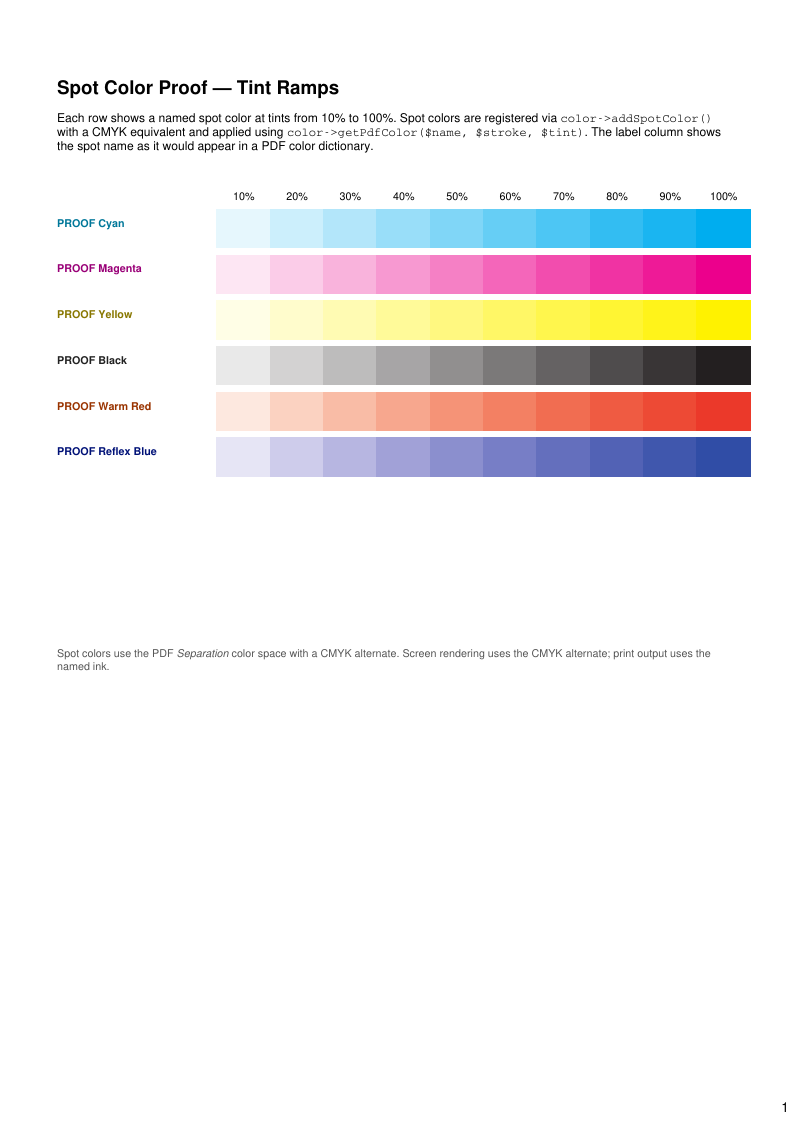
- Rendered PDF: E053_spot_overprint_proof.pdf
- PHP source: E053_spot_overprint_proof.phps
- All examples: /examples/
- Category: Colour
Source Code
<?php
declare(strict_types=1);
/**
* E053_spot_overprint_proof.php
*
* Demonstrates spot color registration, tint ramp generation, a transparency
* soft-proof of stacked inks, and native overprint using tc-lib-color and
* tc-lib-pdf-graph.
*
* What this demonstrates:
* - color->addSpotColor(): register named spot colors with CMYK equivalents.
* - color->getPdfColor($name, $stroke, $tint): apply spot ink at any tint level.
* - Tint ramps: a sequence of filled rectangles stepping from 0% to 100% tint.
* - Layered spot rectangles: approximate ink mixing on screen with semi-transparent shapes.
* - graph->getOverprint($stroking, $nonstroking, $mode): set the /OP, /op and /OPM
* ExtGState entries, e.g. to print 100K black over a colored background without
* knocking it out.
* - Companion lib: tc-lib-color (spot/Lab color model), tc-lib-pdf-graph (rects, ExtGState).
*
* @since 2026-05-01
* @category Library
* @package Pdf
* @author Nicola Asuni <info@tecnick.com>
* @copyright 2002-2026 Nicola Asuni - Tecnick.com LTD
* @license https://www.gnu.org/copyleft/lesser.html GNU-LGPL v3 (see LICENSE)
* @link https://github.com/tecnickcom/tc-lib-pdf
*
* This file is part of tc-lib-pdf software library.
*/
// NOTE: local file reads (images, fonts, attachments) are restricted to an allowlist of
// trusted paths that covers this package tree, so run the examples in place. To read assets
// from other locations, list them in the 'allowedPaths' entry of the fileOptions constructor
// parameter (see E047_remote_resources_security.php).
// NOTE: run make fonts in the project root to generate the dependencies and example fonts.
require __DIR__ . '/../vendor/autoload.php';
define('K_PATH_FONTS', (string) realpath(__DIR__ . '/../vendor/tecnickcom/tc-lib-pdf-font/target/fonts'));
$pdf = new \Com\Tecnick\Pdf\Tcpdf(
unit: \Com\Tecnick\Pdf\Page\Unit::Millimeter,
isunicode: true,
subsetfont: false,
compress: true,
mode: \Com\Tecnick\Pdf\PdfConformance::None,
objEncrypt: null,
);
$pdf->setCreator('tc-lib-pdf');
$pdf->setAuthor('Nicola Asuni');
$pdf->setSubject('tc-lib-pdf example: 053');
$pdf->setTitle('Spot Color & Overprint Proof');
$pdf->setKeywords('TCPDF tc-lib-pdf spot color CMYK tint ramp overprint proof');
$pdf->setPDFFilename('053_spot_overprint_proof.pdf');
$pdf->setViewerPreferences(['DisplayDocTitle' => true]);
$pdf->enableDefaultPageContent();
// ----------
// Register spot colors with CMYK fallback values.
// These simulate industry-standard spot-like named inks. In a real press
// workflow the names would match the RIP spot-color library exactly.
$pdf->color->addSpotColor('PROOF Cyan', new \Com\Tecnick\Color\Model\Cmyk([
'cyan' => 1.0,
'magenta' => 0.0,
'yellow' => 0.0,
'key' => 0.0,
'alpha' => 0.0,
]));
$pdf->color->addSpotColor('PROOF Magenta', new \Com\Tecnick\Color\Model\Cmyk([
'cyan' => 0.0,
'magenta' => 1.0,
'yellow' => 0.0,
'key' => 0.0,
'alpha' => 0.0,
]));
$pdf->color->addSpotColor('PROOF Yellow', new \Com\Tecnick\Color\Model\Cmyk([
'cyan' => 0.0,
'magenta' => 0.0,
'yellow' => 1.0,
'key' => 0.0,
'alpha' => 0.0,
]));
$pdf->color->addSpotColor('PROOF Black', new \Com\Tecnick\Color\Model\Cmyk([
'cyan' => 0.0,
'magenta' => 0.0,
'yellow' => 0.0,
'key' => 1.0,
'alpha' => 0.0,
]));
$pdf->color->addSpotColor('PROOF Warm Red', new \Com\Tecnick\Color\Model\Cmyk([
'cyan' => 0.0,
'magenta' => 0.85,
'yellow' => 0.9,
'key' => 0.02,
'alpha' => 0.0,
]));
$pdf->color->addSpotColor('PROOF Reflex Blue', new \Com\Tecnick\Color\Model\Cmyk([
'cyan' => 0.93,
'magenta' => 0.75,
'yellow' => 0.0,
'key' => 0.02,
'alpha' => 0.0,
]));
// ----------
$labelFont = $pdf->font->insert($pdf->pon, 'helvetica', 'B', 8);
$noteFont = $pdf->font->insert($pdf->pon, 'helvetica', '', 8);
// ===| Page 1 – Tint Ramps |=================================================
$pdf->addPage(['format' => 'A4']);
$pdf->page->addContent($labelFont['out']);
$introHtml = '<h1 style="font-family: helvetica;">Spot Color Proof — Tint Ramps</h1>
<p style="font-family: helvetica; font-size: 9pt;">
Each row shows a named spot color at tints from 10% to 100%.
Spot colors are registered via <code>color->addSpotColor()</code> with a CMYK equivalent
and applied using <code>color->getPdfColor($name, $stroke, $tint)</code>.
The label column shows the spot name as it would appear in a PDF color dictionary.
</p>';
$pdf->addHTMLCell(html: $introHtml, posx: 15, posy: 20, width: 175);
// List of spots to render and their display label color
/** @var array<int, array{name: string, label: string}> $spotRows */
$spotRows = [
['name' => 'PROOF Cyan', 'label' => '#007799'],
['name' => 'PROOF Magenta', 'label' => '#990077'],
['name' => 'PROOF Yellow', 'label' => '#887700'],
['name' => 'PROOF Black', 'label' => '#222222'],
['name' => 'PROOF Warm Red', 'label' => '#993300'],
['name' => 'PROOF Reflex Blue', 'label' => '#001177'],
];
$tintSteps = 10;
$swatchW = 14.0;
$swatchH = 10.0;
$labelW = 42.0;
$rowGap = 2.0;
$startX = 15.0;
$startY = 55.0;
// Draw tint scale header
$pdf->page->addContent($noteFont['out']);
for ($t = 1; $t <= $tintSteps; $t++) {
$tx = $startX + $labelW + (($t - 1) * $swatchW);
$pdf->page->addContent($pdf->getTextCell(
txt: (string) ($t * 10) . '%',
posx: $tx,
posy: $startY - 5,
width: $swatchW,
height: 0,
offset: 0,
linespace: 1,
valign: \Com\Tecnick\Pdf\TextVAlign::Top,
halign: \Com\Tecnick\Pdf\TextHAlign::Center,
));
}
$rowY = $startY;
foreach ($spotRows as $row) {
$spotName = $row['name'];
$labelColor = $row['label'];
// Spot name label
$pdf->page->addContent($labelFont['out']);
$pdf->page->addContent($pdf->color->getPdfColor($labelColor, true, 1.0));
$pdf->page->addContent($pdf->color->getPdfColor($labelColor, false, 1.0));
$pdf->page->addContent($pdf->getTextCell(
txt: $spotName,
posx: $startX,
posy: $rowY + 2,
width: $labelW,
height: 0,
offset: 0,
linespace: 1,
valign: \Com\Tecnick\Pdf\TextVAlign::Top,
halign: \Com\Tecnick\Pdf\TextHAlign::Left,
));
// Draw tint swatches 10%–100%
for ($t = 1; $t <= $tintSteps; $t++) {
$tint = $t / $tintSteps;
$sx = $startX + $labelW + (($t - 1) * $swatchW);
// Set fill and stroke to spot color at this tint level
$pdf->page->addContent($pdf->color->getPdfColor($spotName, true, $tint));
$pdf->page->addContent($pdf->color->getPdfColor($spotName, false, $tint));
$pdf->page->addContent($pdf->graph->getRect($sx, $rowY, $swatchW, $swatchH, 'DF'));
}
$rowY += $swatchH + $rowGap;
}
// Reset to black for subsequent text
$pdf->page->addContent($pdf->color->getPdfColor('black', true, 1.0));
$pdf->page->addContent($pdf->color->getPdfColor('black', false, 1.0));
$pdf->page->addContent($noteFont['out']);
$footNote = '<p style="font-family: helvetica; font-size: 8pt; color: #555555; margin-top: 4mm;">
Spot colors use the PDF <em>Separation</em> color space with a CMYK alternate.
Screen rendering uses the CMYK alternate; print output uses the named ink.
</p>';
$pdf->addHTMLCell(html: $footNote, posx: 15, posy: 170, width: 175);
// ===| Page 2 – Stacked Spot Layers (Transparency Soft-Proof) |=============
$pdf->addPage(['format' => 'A4']);
$pdf->page->addContent($labelFont['out']);
$overHtml = '<h1 style="font-family: helvetica;">Transparency Soft-Proof: Stacked Spot Layers</h1>
<p style="font-family: helvetica; font-size: 9pt;">
Two spot inks are drawn in overlapping rectangles at varying tints, with the top layer
semi-transparent, to approximate the look of two overlapping inks on screen.
This uses transparency, not overprint: see the next page for native overprint
with <code>graph->getOverprint()</code>.
</p>';
$pdf->addHTMLCell(html: $overHtml, posx: 15, posy: 20, width: 175);
// Overprint grid: every combination of Cyan × Magenta at 25/50/75/100% tints
$ox = 25.0;
$oy = 55.0;
$cellSize = 22.0;
/** @var array<int, array{label: string, tint: float}> $tints */
$tints = [
['label' => '25%', 'tint' => 0.25],
['label' => '50%', 'tint' => 0.5],
['label' => '75%', 'tint' => 0.75],
['label' => '100%', 'tint' => 1.0],
];
// Column headers (Cyan tint)
$pdf->page->addContent($labelFont['out']);
foreach ($tints as $ci => $col) {
$pdf->page->addContent($pdf->getTextCell(
txt: 'C ' . $col['label'],
posx: $ox + 12 + ($ci * $cellSize),
posy: $oy - 7,
width: $cellSize,
height: 0,
offset: 0,
linespace: 1,
valign: \Com\Tecnick\Pdf\TextVAlign::Top,
halign: \Com\Tecnick\Pdf\TextHAlign::Center,
));
}
foreach ($tints as $mi => $row) {
// Row header (Magenta tint)
$pdf->page->addContent($pdf->color->getPdfColor('black', false, 1.0));
$pdf->page->addContent($pdf->getTextCell(
txt: 'M ' . $row['label'],
posx: $ox,
posy: $oy + ($mi * $cellSize) + 5,
width: 12,
height: 0,
offset: 0,
linespace: 1,
valign: \Com\Tecnick\Pdf\TextVAlign::Top,
halign: \Com\Tecnick\Pdf\TextHAlign::Left,
));
foreach ($tints as $ci => $col) {
$cx = $ox + 12 + ($ci * $cellSize);
$cy = $oy + ($mi * $cellSize);
// Draw Cyan layer first, then Magenta layer on top
$pdf->page->addContent($pdf->color->getPdfColor('PROOF Cyan', false, $col['tint']));
$pdf->page->addContent($pdf->graph->getRect($cx, $cy, $cellSize, $cellSize, 'F'));
$pdf->page->addContent($pdf->color->getPdfColor('PROOF Magenta', false, $row['tint']));
$pdf->page->addContent($pdf->graph->getAlpha(0.6)); // partial alpha to show both layers
$pdf->page->addContent($pdf->graph->getRect($cx, $cy, $cellSize, $cellSize, 'F'));
$pdf->page->addContent($pdf->graph->getAlpha(1.0)); // restore
}
}
// Reset colors
$pdf->page->addContent($pdf->color->getPdfColor('black', true, 1.0));
$pdf->page->addContent($pdf->color->getPdfColor('black', false, 1.0));
$overNote = '<p style="font-family: helvetica; font-size: 8pt; color: #555555; margin-top: 4mm;">
Each cell renders Cyan at the column tint, then Magenta at the row tint with 60% opacity,
approximating a soft-proof of two overlapping inks on a white substrate.
</p>';
$pdf->addHTMLCell(html: $overNote, posx: 15, posy: 165, width: 175);
// ===| Page 3 – Native Overprint (/OP, /op, /OPM) |==========================
$pdf->addPage(['format' => 'A4']);
$opHtml = '<h1 style="font-family: helvetica;">Native Overprint: 100K Black on a Colored Background</h1>
<p style="font-family: helvetica; font-size: 9pt;">
By default each painted object knocks out the inks below it.
<code>graph->getOverprint($stroking, $nonstroking, $mode)</code> adds an ExtGState with the
<em>/OP</em> (stroking), <em>/op</em> (non-stroking) and <em>/OPM</em> (overprint mode) entries.
With <em>/OPM</em> 1, a DeviceCMYK component with a tint of 0 leaves the ink below unchanged,
so 100K black prints on top of the background and leaves no white gaps when plates are misregistered.
<code>getOverprint(false, false, 0)</code> restores the default knockout behavior.
</p>';
$pdf->addHTMLCell(html: $opHtml, posx: 15, posy: 20, width: 175);
$panelW = 85.0;
$panelH = 60.0;
$panelY = 75.0;
/** @var array<int, array{x: float, title: string, overprint: bool}> $opPanels */
$opPanels = [
['x' => 15.0, 'title' => 'Knockout (default)', 'overprint' => false],
['x' => 110.0, 'title' => 'getOverprint(true, true, 1)', 'overprint' => true],
];
foreach ($opPanels as $panel) {
$px = $panel['x'];
// Panel title
$pdf->page->addContent($labelFont['out']);
$pdf->page->addContent($pdf->color->getPdfColor('black', false, 1.0));
$pdf->page->addContent($pdf->getTextCell(
txt: $panel['title'],
posx: $px,
posy: $panelY - 6,
width: $panelW,
height: 0,
offset: 0,
linespace: 1,
valign: \Com\Tecnick\Pdf\TextVAlign::Top,
halign: \Com\Tecnick\Pdf\TextHAlign::Left,
));
// Background: process CMYK on the top half, spot ink on the bottom half
$pdf->page->addContent($pdf->color->getPdfColor('cmyk(0%,85%,90%,0%)', false, 1.0));
$pdf->page->addContent($pdf->graph->getRect($px, $panelY, $panelW, $panelH / 2, 'F'));
$pdf->page->addContent($pdf->color->getPdfColor('PROOF Reflex Blue', false, 1.0));
$pdf->page->addContent($pdf->graph->getRect($px, $panelY + ($panelH / 2), $panelW, $panelH / 2, 'F'));
if ($panel['overprint']) {
// Overprint for stroking and non-stroking operations, nonzero overprint mode
$pdf->page->addContent($pdf->graph->getOverprint(true, true, 1));
}
// 100K black (DeviceCMYK) text, fill and stroke across both backgrounds
$pdf->page->addContent($pdf->color->getPdfColor('cmyk(0%,0%,0%,100%)', false, 1.0));
$pdf->page->addContent($pdf->color->getPdfColor('cmyk(0%,0%,0%,100%)', true, 1.0));
$bigFont = $pdf->font->insert($pdf->pon, 'helvetica', 'B', 28);
$pdf->page->addContent($bigFont['out']);
$pdf->page->addContent($pdf->getTextCell(
txt: '100K',
posx: $px,
posy: $panelY + 4,
width: $panelW,
height: 0,
offset: 0,
linespace: 1,
valign: \Com\Tecnick\Pdf\TextVAlign::Top,
halign: \Com\Tecnick\Pdf\TextHAlign::Center,
));
$pdf->font->popLastFont();
$pdf->page->addContent($pdf->font->getOutCurrentFont());
$pdf->page->addContent($pdf->graph->getRect($px + 10, $panelY + 22, $panelW - 20, 16, 'F'));
$pdf->page->addContent($pdf->graph->getLine($px + 5, $panelY + 46, $px + $panelW - 5, $panelY + 46, [
'lineWidth' => 1.5,
'lineCap' => 'butt',
]));
if ($panel['overprint']) {
// Restore knockout
$pdf->page->addContent($pdf->graph->getOverprint(false, false, 0));
}
}
$pdf->page->addContent($pdf->color->getPdfColor('black', true, 1.0));
$pdf->page->addContent($pdf->color->getPdfColor('black', false, 1.0));
$pdf->page->addContent($noteFont['out']);
$opNote = '<p style="font-family: helvetica; font-size: 8pt; color: #555555;">
Most screen viewers ignore overprint, so both panels look the same.
Enable <em>Overprint Preview</em> or <em>Output Preview</em> in Acrobat, or render the
separations with Ghostscript (<code>-sDEVICE=tiffsep</code>), to see the difference:
in the left panel the background inks are removed under the black objects,
in the right panel they are kept and the black prints on top.
Overprint is a print-production feature and does not use transparency.
</p>';
$pdf->addHTMLCell(html: $opNote, posx: 15, posy: 145, width: 175);
// ----------
$rawpdf = $pdf->getOutPDFString();
$pdf->renderPDF(rawpdf: $rawpdf);