
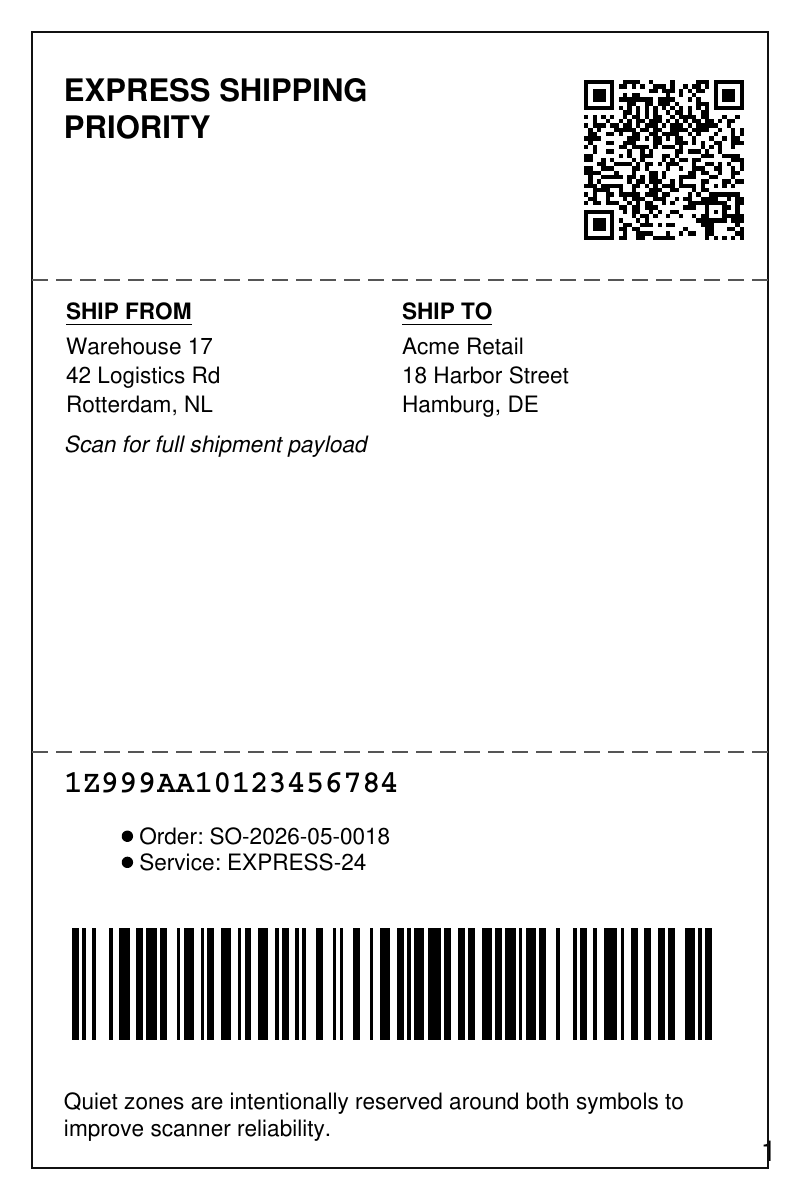
A shipping label combining Code 128 and QR Code with the address block and routing text.
- Rendered PDF: E050_shipping_label_barcodes.pdf
- PHP source: E050_shipping_label_barcodes.phps
- All examples: /examples/
- Category: Barcodes
- Guide: tc-lib-barcode
Source Code
<?php

declare(strict_types=1);

/**
 * E050_shipping_label_barcodes.php
 *
 * Demonstrates a production-style shipping label with 1D and 2D barcodes,
 * quiet-zone padding, and human-readable tracking details.
 *
 * @since       2026-05-01
 * @category    Library
 * @package     Pdf
 * @author      Nicola Asuni <info@tecnick.com>
 * @copyright   2002-2026 Nicola Asuni - Tecnick.com LTD
 * @license     https://www.gnu.org/copyleft/lesser.html GNU-LGPL v3 (see LICENSE)
 * @link        https://github.com/tecnickcom/tc-lib-pdf
 *
 * This file is part of tc-lib-pdf software library.
 */

// NOTE: local file reads (images, fonts, attachments) are restricted to an allowlist of
// trusted paths that covers this package tree, so run the examples in place. To read assets
// from other locations, list them in the 'allowedPaths' entry of the fileOptions constructor
// parameter (see E047_remote_resources_security.php).

// NOTE: run make fonts in the project root to generate the dependencies and example fonts.

require __DIR__ . '/../vendor/autoload.php';

define('K_PATH_FONTS', (string) realpath(__DIR__ . '/../vendor/tecnickcom/tc-lib-pdf-font/target/fonts'));

$pdf = new \Com\Tecnick\Pdf\Tcpdf(
    unit: \Com\Tecnick\Pdf\Page\Unit::Millimeter,
    isunicode: true,
    subsetfont: false,
    compress: true,
    mode: \Com\Tecnick\Pdf\PdfConformance::None,
    objEncrypt: null,
);

$pdf->setCreator('tc-lib-pdf');
$pdf->setAuthor('Nicola Asuni');
$pdf->setSubject('tc-lib-pdf example: 050');
$pdf->setTitle('Shipping Label with Barcodes');
$pdf->setKeywords('TCPDF tc-lib-pdf example shipping label barcode qrcode code128');
$pdf->setPDFFilename('050_shipping_label_barcodes.pdf');
$pdf->setViewerPreferences(['DisplayDocTitle' => true]);
$pdf->enableDefaultPageContent();

// Initialize default font for text rendering
$defaultFont = $pdf->font->insert($pdf->pon, 'helvetica', '', 8);

$pdf->addPage([
    'width' => 100.0,
    'height' => 150.0,
    'margin' => [
        'PL' => 5.0,
        'PR' => 5.0,
        'CT' => 5.0,
        'CB' => 5.0,
    ],
]);

$frameStyle = ['all' => ['lineWidth' => 0.35, 'lineColor' => '#111111']];
$sepStyle = ['all' => ['lineWidth' => 0.2, 'lineColor' => '#555555', 'dashArray' => [2, 1]]];
$barcodeStyle = [
    'lineWidth' => 0,
    'lineCap' => 'butt',
    'lineJoin' => 'miter',
    'dashArray' => [],
    'dashPhase' => 0,
    'lineColor' => 'black',
    'fillColor' => 'black',
];

// Draw frame and separators
$pdf->page->addContent($pdf->graph->getRect(4, 4, 92, 142, 'D', $frameStyle));
$pdf->page->addContent($pdf->graph->getLine(4, 35, 96, 35, $sepStyle['all']));
$pdf->page->addContent($pdf->graph->getLine(4, 94, 96, 94, $sepStyle['all']));

// Header section
$headerHtml = '<div style="text-align: left;">
    <p style="font-family: helvetica; font-weight: bold; font-size: 11pt; margin: 0;">EXPRESS SHIPPING</p>
    <p style="font-family: helvetica; font-weight: bold; font-size: 11pt; margin: 0;">PRIORITY</p>
</div>';
$pdf->addHTMLCell(html: $headerHtml, posx: 8, posy: 9, width: 50);

// QR code in top-right
$qrPayload = "TRACK:1Z999AA10123456784\nORDER:SO-2026-05-0018\nSERVICE:EXPRESS-24\nFROM:NL-RTM-W17\nTO:DE-HAM-ACME";
$pdf->page->addContent($pdf->getBarcode(
    type: 'QRCODE,M',
    code: $qrPayload,
    posx: 72,
    posy: 9,
    width: 20,
    height: 20,
    padding: [1, 1, 1, 1],
    style: $barcodeStyle,
));

// Address section
$addressHtml = '<table cellpadding="1" cellspacing="0" border="0" width="100%">
    <tr>
        <td width="50%" style="vertical-align: top; font-family: helvetica; font-size: 8pt;">
            <p style="font-weight: bold; margin: 0; padding-bottom: 1mm;"><u>SHIP FROM</u></p>
            <p style="margin: 0; line-height: 1.3;">Warehouse 17<br/>42 Logistics Rd<br/>Rotterdam, NL</p>
        </td>
        <td width="50%" style="vertical-align: top; font-family: helvetica; font-size: 8pt;">
            <p style="font-weight: bold; margin: 0; padding-bottom: 1mm;"><u>SHIP TO</u></p>
            <p style="margin: 0; line-height: 1.3;">Acme Retail<br/>18 Harbor Street<br/>Hamburg, DE</p>
        </td>
    </tr>
</table>
<p style="font-family: helvetica; font-size: 8pt; margin: 1mm 0 0 0; text-align: center;">
    <em>Scan for full shipment payload</em>
</p>';
$pdf->addHTMLCell(html: $addressHtml, posx: 8, posy: 37, width: 84);

$tracking = '1Z999AA10123456784';
$orderRef = 'SO-2026-05-0018';
$service = 'EXPRESS-24';

// Tracking section
$trackingHtml =
    '<div style="font-family: courier; font-weight: bold; font-size: 11pt; margin-bottom: 2mm;">
    '
    . htmlspecialchars($tracking)
    . '
</div>
<ul style="font-family: helvetica; font-size: 8pt;">
    <li>Order: '
    . htmlspecialchars($orderRef)
    . '</li>
    <li>Service: '
    . htmlspecialchars($service)
    . '</li>
</ul>';
$pdf->addHTMLCell(html: $trackingHtml, posx: 8, posy: 96, width: 84);

// 1D barcode
$pdf->page->addContent($pdf->getBarcode(
    type: 'C128',
    code: $tracking,
    posx: 8,
    posy: 115,
    width: 80,
    height: 14,
    padding: [1, 1, 1, 1],
    style: $barcodeStyle,
));

// Footer text
$footerHtml = '<p style="font-family: helvetica; font-size: 8pt; margin: 0; text-align: left; line-height: 1.2;">
    Quiet zones are intentionally reserved around both symbols to improve scanner reliability.
</p>';
$pdf->addHTMLCell(html: $footerHtml, posx: 8, posy: 136, width: 84);

$rawpdf = $pdf->getOutPDFString();
$pdf->renderPDF(rawpdf: $rawpdf);