
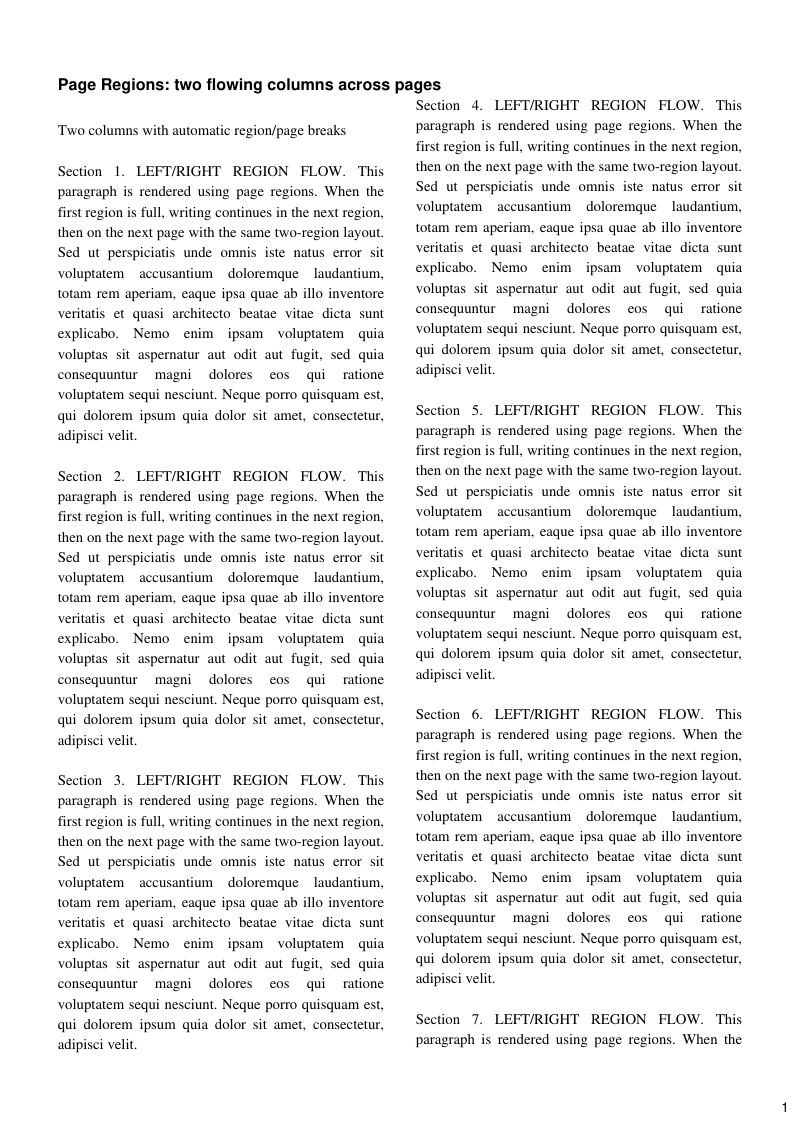
Text regions computed as equal columns from the content area, with text flowing from one into the next.
- Rendered PDF: E019_page_regions.pdf
- PHP source: E019_page_regions.phps
- All examples: /examples/
- Category: Pages and Layout
- Guide: HTML and CSS
Source Code
<?php

declare(strict_types=1);

/**
 * E019_page_regions.php
 *
 * @since       2026-04-26
 * @category    Library
 * @package     Pdf
 * @author      Nicola Asuni <info@tecnick.com>
 * @copyright   2002-2026 Nicola Asuni - Tecnick.com LTD
 * @license     https://www.gnu.org/copyleft/lesser.html GNU-LGPL v3 (see LICENSE)
 * @link        https://github.com/tecnickcom/tc-lib-pdf
 *
 * This file is part of tc-lib-pdf software library.
 */

// NOTE: local file reads (images, fonts, attachments) are restricted to an allowlist of
// trusted paths that covers this package tree, so run the examples in place. To read assets
// from other locations, list them in the 'allowedPaths' entry of the fileOptions constructor
// parameter (see E047_remote_resources_security.php).

// NOTE: run make fonts in the project root to generate the dependencies and example fonts.

// autoloader when using Composer
require __DIR__ . '/../vendor/autoload.php';

// define fonts directory
\define('K_PATH_FONTS', \realpath(__DIR__ . '/../vendor/tecnickcom/tc-lib-pdf-font/target/fonts'));

// autoloader when using RPM or DEB package installation
//require ('/usr/share/php/Com/Tecnick/Pdf/autoload.php');

// main TCPDF object
$pdf = new \Com\Tecnick\Pdf\Tcpdf(
    unit: \Com\Tecnick\Pdf\Page\Unit::Millimeter,
    isunicode: true,
    subsetfont: false,
    compress: true,
    mode: \Com\Tecnick\Pdf\PdfConformance::None,
    objEncrypt: null,
);

// ----------

$pdf->setCreator('tc-lib-pdf');
$pdf->setAuthor('Nicola Asuni');
$pdf->setSubject('tc-lib-pdf example: 019');
$pdf->setTitle('Page regions example');
$pdf->setKeywords('TCPDF tc-lib-pdf example page regions columns');
$pdf->setPDFFilename('019_page_regions.pdf');

$pdf->setViewerPreferences(['DisplayDocTitle' => true]);

$pdf->enableDefaultPageContent();

// ----------
// Insert fonts

$titlefont = $pdf->font->insert($pdf->pon, 'helvetica', 'B', 12);
$textfont = $pdf->font->insert($pdf->pon, 'times', '', 11);

// ----------
// Two text regions (columns) generated from the content area.

$leftMargin = 15.0;
$rightMargin = 15.0;
$topMargin = 20.0;
$bottomMargin = 20.0;
$columnGap = 8.0;

$contentWidth = 210.0 - $leftMargin - $rightMargin;
$contentHeight = 297.0 - $topMargin - $bottomMargin;
$columnWidth = ($contentWidth - $columnGap) / 2.0;

$page = $pdf->addPage([
    'margin' => [
        'PL' => $leftMargin,
        'PR' => $rightMargin,
        'CT' => $topMargin,
        'CB' => $bottomMargin,
    ],
    'region' => [
        [
            'RX' => $leftMargin,
            'RY' => $topMargin,
            'RW' => $columnWidth,
            'RH' => $contentHeight,
        ],
        [
            'RX' => $leftMargin + $columnWidth + $columnGap,
            'RY' => $topMargin,
            'RW' => $columnWidth,
            'RH' => $contentHeight,
        ],
    ],
]);

$pdf->page->addContent($titlefont['out']);
$pdf->addTextCell(
    txt: 'Page Regions: two flowing columns across pages',
    pid: $page['pid'],
    posx: 0, // NOTE: addTextCell() coordinates are relative to the current page region
    posy: 0,
    width: 0,
    height: 0,
    offset: 0,
    linespace: 0,
    valign: \Com\Tecnick\Pdf\TextVAlign::Top,
    halign: \Com\Tecnick\Pdf\TextHAlign::Left,
    cell: null,
    styles: [],
    strokewidth: 0,
    wordspacing: 0,
    leading: 0,
    rise: 0,
    jlast: true,
    fill: true,
    stroke: false,
    underline: false,
    linethrough: false,
    overline: false,
    clip: false,
    drawcell: false,
);

$pdf->page->addContent($textfont['out']);

$leftPrefix =
    'LEFT/RIGHT REGION FLOW. This paragraph is rendered using page regions. '
    . 'When the first region is full, writing continues in the next region, '
    . 'then on the next page with the same two-region layout. ';

$baseParagraph =
    'Sed ut perspiciatis unde omnis iste natus error sit voluptatem accusantium doloremque '
    . 'laudantium, totam rem aperiam, eaque ipsa quae ab illo inventore veritatis et quasi architecto '
    . 'beatae vitae dicta sunt explicabo. Nemo enim ipsam voluptatem quia voluptas sit aspernatur aut '
    . 'odit aut fugit, sed quia consequuntur magni dolores eos qui ratione voluptatem sequi nesciunt. '
    . 'Neque porro quisquam est, qui dolorem ipsum quia dolor sit amet, consectetur, adipisci velit.';

$chunks = [];
for ($idx = 1; $idx <= 20; ++$idx) {
    $chunks[] = 'Section ' . $idx . '. ' . $leftPrefix . $baseParagraph;
}

$content = "Two columns with automatic region/page breaks\n\n" . \implode("\n\n", $chunks);

$region = $pdf->page->getRegion($page['pid']);
$regionWidth = (float) $region['RW'];

$pdf->addTextCell(
    txt: $content,
    pid: $page['pid'],
    posx: 0,
    posy: 12,
    width: $regionWidth,
    height: 0,
    offset: 0,
    linespace: 1,
    valign: \Com\Tecnick\Pdf\TextVAlign::Top,
    halign: \Com\Tecnick\Pdf\TextHAlign::Justify,
    cell: null,
    styles: [],
    strokewidth: 0,
    wordspacing: 0,
    leading: 0,
    rise: 0,
    jlast: true,
    fill: true,
    stroke: false,
    underline: false,
    linethrough: false,
    overline: false,
    clip: false,
    drawcell: false,
);

// --- Same example using HTML ---

$pageH = $pdf->addPage([
    'margin' => [
        'PL' => $leftMargin,
        'PR' => $rightMargin,
        'CT' => $topMargin,
        'CB' => $bottomMargin,
    ],
    'region' => [
        [
            'RX' => $leftMargin,
            'RY' => $topMargin,
            'RW' => $columnWidth,
            'RH' => $contentHeight,
        ],
        [
            'RX' => $leftMargin + $columnWidth + $columnGap,
            'RY' => $topMargin,
            'RW' => $columnWidth,
            'RH' => $contentHeight,
        ],
    ],
]);

$contentHtml =
    '<p>'
    . \str_replace("\n\n", '</p><p>', \htmlspecialchars($content, \ENT_QUOTES | \ENT_SUBSTITUTE, 'UTF-8'))
    . '</p>';

$pdf->page->selectRegion(0, $pageH['pid']);
$regionH = $pdf->page->getRegion($pageH['pid']);

$pdf->addHTMLCell(
    html: $contentHtml,
    posx: (float) $regionH['RX'],
    posy: (float) $regionH['RY'],
    width: (float) $regionH['RW'],
);

// --- Test add addTextCellXY() for absolute page coordinates ---

$page = $pdf->addPage([
    'margin' => [
        'PL' => 15.0,
        'PR' => 15.0,
        'CT' => 15.0,
        'CB' => 15.0,
    ],
]);

$pdf->addTextCellXY(
    txt: 'addTextCellXY() uses absolute page coordinates [X=0, Y=0].',
    posx: 0,
    posy: 0,
    drawcell: false,
);

$pdf->addTextCell(
    txt: 'addTextCell() uses relative page region coordinates [x=0, y=0] => [X=15, Y=15].',
    posx: 0,
    posy: 0,
    drawcell: false,
);

// =============================================================

$rawpdf = $pdf->getOutPDFString();

$pdf->renderPDF(rawpdf: $rawpdf);