
Rectangles that text and HTML flow must avoid, so content wraps around a reserved area.
- Rendered PDF: E080_no_write_regions.pdf
- PHP source: E080_no_write_regions.phps
- All examples: /examples/
- Category: Pages and Layout
- Guide: HTML and CSS
Source Code
<?php

declare(strict_types=1);

/**
 * E080_no_write_regions.php
 *
 * No-write page regions.
 *
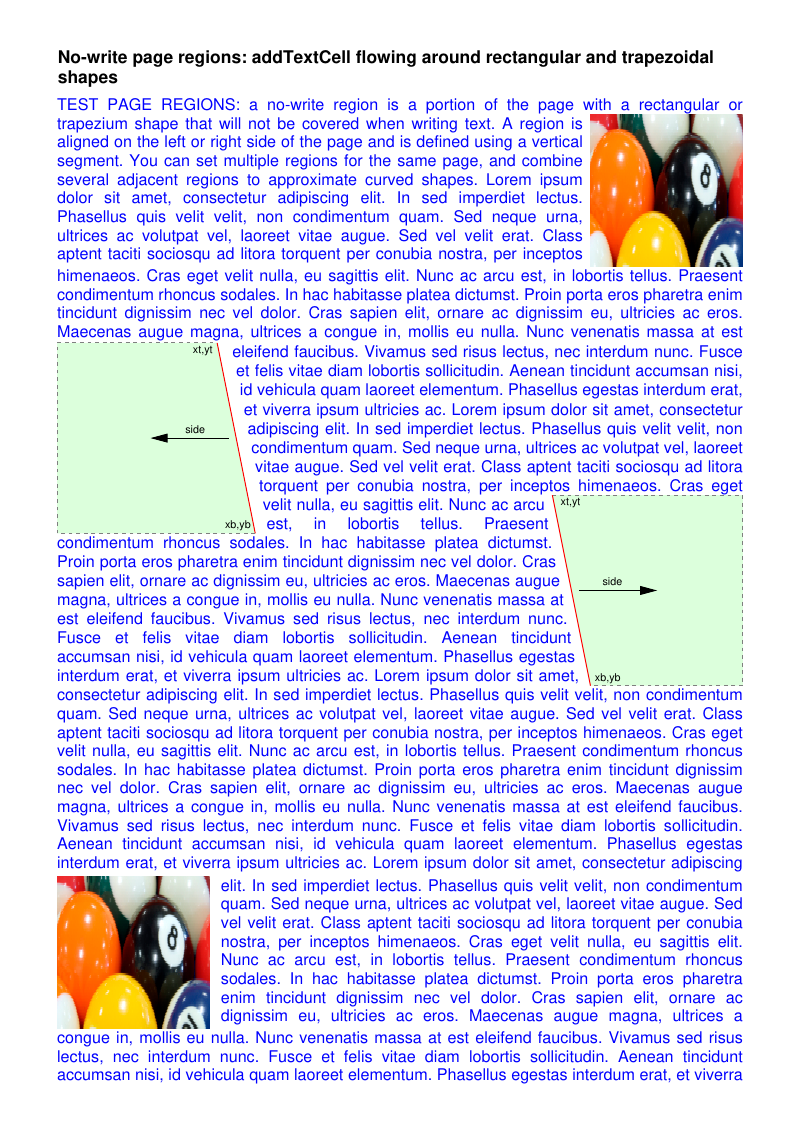
 * A no-write region is a portion of the page that flowing text avoids. Each region is a
 * vertical, possibly slanted, segment plus the page side it blocks ('L' or 'R').
 * tc-lib-pdf-page approximates the resulting writable area with a stack of rectangular
 * regions (one per horizontal band), so text flows down the page hugging the obstacle.
 * Several adjacent segments approximate curved shapes (see the circle in the second
 * scenario). See Com\Tecnick\Pdf\Page\Region::setNoWriteRegions().
 *
 * Each obstacle scenario is rendered twice, on consecutive pages:
 *   - with addTextCell()  (plain flowing text);
 *   - with addHTMLCell()  (HTML cell), producing the same visual result.
 * Both engines hug the rectangular, trapezoidal and circular obstacles band by band and, when
 * the text overflows the last region, continue on a fresh full-width page (no-write regions are
 * page-specific, so the continuation page has no obstacles).
 *
 * The band height must be at least one text line tall; with a 12pt font (~4.9mm line height) a
 * 5mm band fits exactly one line, giving the finest (per-line) staircase.
 *
 * @since       2026-06-16
 * @category    Library
 * @package     Pdf
 * @author      Nicola Asuni <info@tecnick.com>
 * @copyright   2002-2026 Nicola Asuni - Tecnick.com LTD
 * @license     https://www.gnu.org/copyleft/lesser.html GNU-LGPL v3 (see LICENSE)
 * @link        https://github.com/tecnickcom/tc-lib-pdf
 *
 * This file is part of tc-lib-pdf software library.
 */

// NOTE: local file reads (images, fonts, attachments) are restricted to an allowlist of
// trusted paths that covers this package tree, so run the examples in place. To read assets
// from other locations, list them in the 'allowedPaths' entry of the fileOptions constructor
// parameter (see E047_remote_resources_security.php).

// NOTE: run make fonts in the project root to generate the dependencies and example fonts.

// autoloader when using Composer
require __DIR__ . '/../vendor/autoload.php';

// define fonts directory
\define('K_PATH_FONTS', \realpath(__DIR__ . '/../vendor/tecnickcom/tc-lib-pdf-font/target/fonts'));

// autoloader when using RPM or DEB package installation
//require ('/usr/share/php/Com/Tecnick/Pdf/autoload.php');

// main TCPDF object
$pdf = new \Com\Tecnick\Pdf\Tcpdf(
    unit: \Com\Tecnick\Pdf\Page\Unit::Millimeter,
    isunicode: true,
    subsetfont: false,
    compress: true,
    mode: \Com\Tecnick\Pdf\PdfConformance::None,
    objEncrypt: null,
);

// ----------

$pdf->setCreator('tc-lib-pdf');
$pdf->setAuthor('Nicola Asuni');
$pdf->setSubject('tc-lib-pdf example: 080');
$pdf->setTitle('No-write page regions');
$pdf->setKeywords('TCPDF tc-lib-pdf example no-write page regions wrap text shape');
$pdf->setPDFFilename('080_no_write_regions.pdf');

$pdf->setViewerPreferences(['DisplayDocTitle' => true]);

// ----------
// Fonts: 12pt body, 8pt annotation labels.
// The font engine keeps the last inserted font as the current one, so each font is
// (re)inserted with insertFont() right before it is used.

$insertFont = static function (string $style, float $size) use ($pdf): void {
    $font = $pdf->font->insert($pdf->pon, 'helvetica', $style, $size);
    $pdf->page->addContent($font['out']);
};

// ----------
// Colours.

$black = $pdf->color->getPdfColor('rgb(0,0,0)'); // titles and labels (single-line, no page break)
$bodyBlue = 'rgb(0,0,255)'; // flowing body text (justified)

// Graphic styles: light-green fill, the no-write edge in red, the other edges in grey dashed.
$fillStyle = [
    'lineWidth' => 0.254,
    'lineCap' => 'butt',
    'lineJoin' => 'miter',
    'dashArray' => [1, 1],
    'dashPhase' => 0,
    'lineColor' => 'rgb(127,127,127)',
    'fillColor' => 'rgb(220,255,220)',
];
$edgeGrey = [
    'lineWidth' => 0.254,
    'lineCap' => 'butt',
    'lineJoin' => 'miter',
    'dashArray' => [1, 1],
    'dashPhase' => 0,
    'lineColor' => 'rgb(127,127,127)',
];
$edgeRed = [
    'lineWidth' => 0.254,
    'lineCap' => 'butt',
    'lineJoin' => 'miter',
    'dashArray' => [],
    'dashPhase' => 0,
    'lineColor' => 'rgb(255,0,0)',
];
$arrowStyle = [
    'lineWidth' => 0.254,
    'lineCap' => 'butt',
    'lineJoin' => 'miter',
    'dashArray' => [],
    'dashPhase' => 0,
    'lineColor' => 'rgb(0,0,0)',
];

// Image used as a rectangular obstacle.
$imgFile = \realpath(__DIR__ . '/images/200x100_RGBICC.jpg');
$imgId = $pdf->image->add($imgFile);

// Flowing body text (blue and justified).
$intro =
    'TEST PAGE REGIONS: a no-write region is a portion of the page with a rectangular or '
    . 'trapezium shape that will not be covered when writing text. A region is aligned on the '
    . 'left or right side of the page and is defined using a vertical segment. You can set '
    . 'multiple regions for the same page, and combine several adjacent regions to approximate '
    . 'curved shapes.';

$lorem =
    'Lorem ipsum dolor sit amet, consectetur adipiscing elit. In sed imperdiet lectus. Phasellus '
    . 'quis velit velit, non condimentum quam. Sed neque urna, ultrices ac volutpat vel, laoreet '
    . 'vitae augue. Sed vel velit erat. Class aptent taciti sociosqu ad litora torquent per conubia '
    . 'nostra, per inceptos himenaeos. Cras eget velit nulla, eu sagittis elit. Nunc ac arcu est, in '
    . 'lobortis tellus. Praesent condimentum rhoncus sodales. In hac habitasse platea dictumst. Proin '
    . 'porta eros pharetra enim tincidunt dignissim nec vel dolor. Cras sapien elit, ornare ac '
    . 'dignissim eu, ultricies ac eros. Maecenas augue magna, ultrices a congue in, mollis eu nulla. '
    . 'Nunc venenatis massa at est eleifend faucibus. Vivamus sed risus lectus, nec interdum nunc. '
    . 'Fusce et felis vitae diam lobortis sollicitudin. Aenean tincidunt accumsan nisi, id vehicula '
    . 'quam laoreet elementum. Phasellus egestas interdum erat, et viverra ipsum ultricies ac.';

// More text than fits on a no-write page: with automatic page break enabled the flow continues
// on a fresh page. No-write regions are page-specific, so that continuation page has no
// obstacles and the text returns to the full page width.
$body = $intro . ' ' . \str_repeat($lorem . ' ', 5);

$margin = [
    'PL' => 15.0,
    'PR' => 15.0,
    'CT' => 25.0,
    'CB' => 12.0,
];
$bandHeight = 5.0;

// =============================================================
// Reusable building blocks, so each obstacle scenario can be rendered identically with the
// plain-text engine (addTextCell) and the HTML engine (addHTMLCell).

// Add a page and print its (black) title.
$startPage = static function (string $title) use ($pdf, $margin, $black, $insertFont): array {
    $page = $pdf->addPage(['margin' => $margin]);
    $pdf->page->addContent($black);
    $insertFont('B', 13);
    $pdf->addTextCellXY(txt: $title, posx: 15, posy: 12, drawcell: false);

    return $page;
};

// Draw the two image obstacles plus the two trapezoids (with xt,yt / xb,yb / side labels and
// direction arrows) and register the matching no-write regions.
$setupTrapezoids = static function (float $pageHeight) use (
    $pdf,
    $imgId,
    $fillStyle,
    $edgeGrey,
    $edgeRed,
    $arrowStyle,
    $black,
    $insertFont,
    $bandHeight,
): void {
    // Two image obstacles: top-right and bottom-left.
    $pdf->page->addContent($pdf->image->getSetImage($imgId, 155, 30, 40, 40, $pageHeight));
    $pdf->page->addContent($pdf->image->getSetImage($imgId, 15, 230, 40, 40, $pageHeight));

    // Left trapezoid: the slanted right edge (57,90)-(67,140) is the no-write boundary (red).
    $pdf->page->addContent($pdf->graph->getPolygon([15, 90, 57, 90, 67, 140, 15, 140, 15, 90], 'DF', [
        'all' => $fillStyle,
        0 => $edgeGrey,
        1 => $edgeRed,
        2 => $edgeGrey,
        3 => $edgeGrey,
    ]));

    // Right trapezoid: the slanted left edge (155,180)-(145,130) is the no-write boundary (red).
    $pdf->page->addContent($pdf->graph->getPolygon([145, 130, 195, 130, 195, 180, 155, 180, 145, 130], 'DF', [
        'all' => $fillStyle,
        0 => $edgeGrey,
        1 => $edgeGrey,
        2 => $edgeGrey,
        3 => $edgeRed,
    ]));

    // Annotation labels and direction arrows (8pt black).
    $pdf->page->addContent($black);
    $insertFont('', 8);
    $pdf->addTextCellXY(
        txt: 'xt,yt',
        posx: 38,
        posy: 90,
        width: 18,
        halign: \Com\Tecnick\Pdf\TextHAlign::Right,
        drawcell: false,
    );
    $pdf->addTextCellXY(
        txt: 'xb,yb',
        posx: 48,
        posy: 136,
        width: 18,
        halign: \Com\Tecnick\Pdf\TextHAlign::Right,
        drawcell: false,
    );
    $pdf->addTextCellXY(
        txt: 'side',
        posx: 38,
        posy: 111,
        width: 16,
        halign: \Com\Tecnick\Pdf\TextHAlign::Right,
        drawcell: false,
    );
    $pdf->page->addContent($pdf->graph->getArrow(60, 115, 40, 115, 2, 4, 15, $arrowStyle));

    $pdf->addTextCellXY(
        txt: 'xt,yt',
        posx: 147,
        posy: 130,
        width: 18,
        halign: \Com\Tecnick\Pdf\TextHAlign::Left,
        drawcell: false,
    );
    $pdf->addTextCellXY(
        txt: 'xb,yb',
        posx: 156,
        posy: 176,
        width: 18,
        halign: \Com\Tecnick\Pdf\TextHAlign::Left,
        drawcell: false,
    );
    $pdf->addTextCellXY(
        txt: 'side',
        posx: 158,
        posy: 151,
        width: 16,
        halign: \Com\Tecnick\Pdf\TextHAlign::Left,
        drawcell: false,
    );
    $pdf->page->addContent($pdf->graph->getArrow(152, 155, 172, 155, 2, 4, 15, $arrowStyle));

    // No-write regions: each is a segment (xt,yt)-(xb,yb) plus the blocked page side.
    $pdf->page->setNoWriteRegions(
        [
            ['xt' => 153, 'yt' => 30, 'xb' => 153, 'yb' => 70, 'side' => 'R'], // top-right image
            ['xt' => 60, 'yt' => 90, 'xb' => 70, 'yb' => 140, 'side' => 'L'], // left trapezoid
            ['xt' => 143, 'yt' => 130, 'xb' => 153, 'yb' => 180, 'side' => 'R'], // right trapezoid
            ['xt' => 58, 'yt' => 230, 'xb' => 58, 'yb' => 270, 'side' => 'L'], // bottom-left image
        ],
        $bandHeight,
    );
};

// Draw the circular obstacle (left half-disc against the right content edge) traced by eight
// adjacent right-side segments, and register the matching no-write regions.
$setupCircle = static function () use ($pdf, $fillStyle, $bandHeight): void {
    $pdf->page->addContent($pdf->graph->getPolygon(
        [
            195,
            110,
            179.693,
            113.045,
            166.716,
            121.716,
            158.045,
            134.693,
            155,
            150,
            158.045,
            165.307,
            166.716,
            178.284,
            179.693,
            186.955,
            195,
            190,
        ],
        'DF',
        ['all' => $fillStyle],
    ));

    $pdf->page->setNoWriteRegions([
        ['xt' => 195, 'yt' => 110, 'xb' => 179.693, 'yb' => 113.045, 'side' => 'R'],
        ['xt' => 179.693, 'yt' => 113.045, 'xb' => 166.716, 'yb' => 121.716, 'side' => 'R'],
        ['xt' => 166.716, 'yt' => 121.716, 'xb' => 158.045, 'yb' => 134.693, 'side' => 'R'],
        ['xt' => 158.045, 'yt' => 134.693, 'xb' => 155, 'yb' => 150, 'side' => 'R'],
        ['xt' => 155, 'yt' => 150, 'xb' => 158.045, 'yb' => 165.307, 'side' => 'R'],
        ['xt' => 158.045, 'yt' => 165.307, 'xb' => 166.716, 'yb' => 178.284, 'side' => 'R'],
        ['xt' => 166.716, 'yt' => 178.284, 'xb' => 179.693, 'yb' => 186.955, 'side' => 'R'],
        ['xt' => 179.693, 'yt' => 186.955, 'xb' => 195, 'yb' => 190, 'side' => 'R'],
    ], $bandHeight);
};

// Flow the body with the plain-text engine. width 0 makes each band use its own writable width.
// The fill colour is set through the graph so it is tracked and re-applied automatically when the
// flow continues on an automatically added page (the colour resets per page).
$renderTextBody = static function () use ($pdf, $body, $bodyBlue, $insertFont): void {
    $pdf->page->addContent($pdf->graph->add(['fillColor' => $bodyBlue]));
    $insertFont('', 12);
    $pdf->addTextCell(
        txt: $body,
        posx: 0,
        posy: 0,
        width: 0,
        halign: \Com\Tecnick\Pdf\TextHAlign::Justify,
        drawcell: false,
    );
};

// Flow the SAME body with the HTML engine. A single justified, coloured paragraph hugs the
// obstacle band by band exactly like addTextCell, and overflows onto a fresh full-width page.
// A font must be active before addHTMLCell(). getHTMLCell() returns the same rendering as a
// string instead of emitting it (e.g. $code = $pdf->getHTMLCell(...); $pdf->page->addContent($code);).
$renderHtmlBody = static function () use ($pdf, $body, $bodyBlue, $insertFont): void {
    $insertFont('', 12);
    $region = $pdf->page->getRegion();
    $html = '<p style="text-align:justify;color:' . $bodyBlue . ';">' . $body . '</p>';
    $pdf->addHTMLCell(
        html: $html,
        posx: (float) $region['RX'],
        posy: (float) $region['RY'],
        width: (float) $region['RW'],
    );
};

// =============================================================
// SCENARIO 1: rectangular and trapezoidal no-write regions around two images.

$page = $startPage('No-write page regions: addTextCell flowing around rectangular and trapezoidal shapes');
$pageHeight = (float) $page['height'];
$setupTrapezoids($pageHeight);
$renderTextBody();

$startPage('No-write page regions: addHTMLCell flowing around rectangular and trapezoidal shapes');
$setupTrapezoids($pageHeight);
$renderHtmlBody();

// =============================================================
// SCENARIO 2: eight adjacent regions approximating a circle (text wraps its left side).

$startPage('No-write page regions: addTextCell flowing around a circular shape (8 adjacent segments)');
$setupCircle();
$renderTextBody();

$startPage('No-write page regions: addHTMLCell flowing around a circular shape (8 adjacent segments)');
$setupCircle();
$renderHtmlBody();

// =============================================================

$rawpdf = $pdf->getOutPDFString();

$pdf->renderPDF(rawpdf: $rawpdf);