
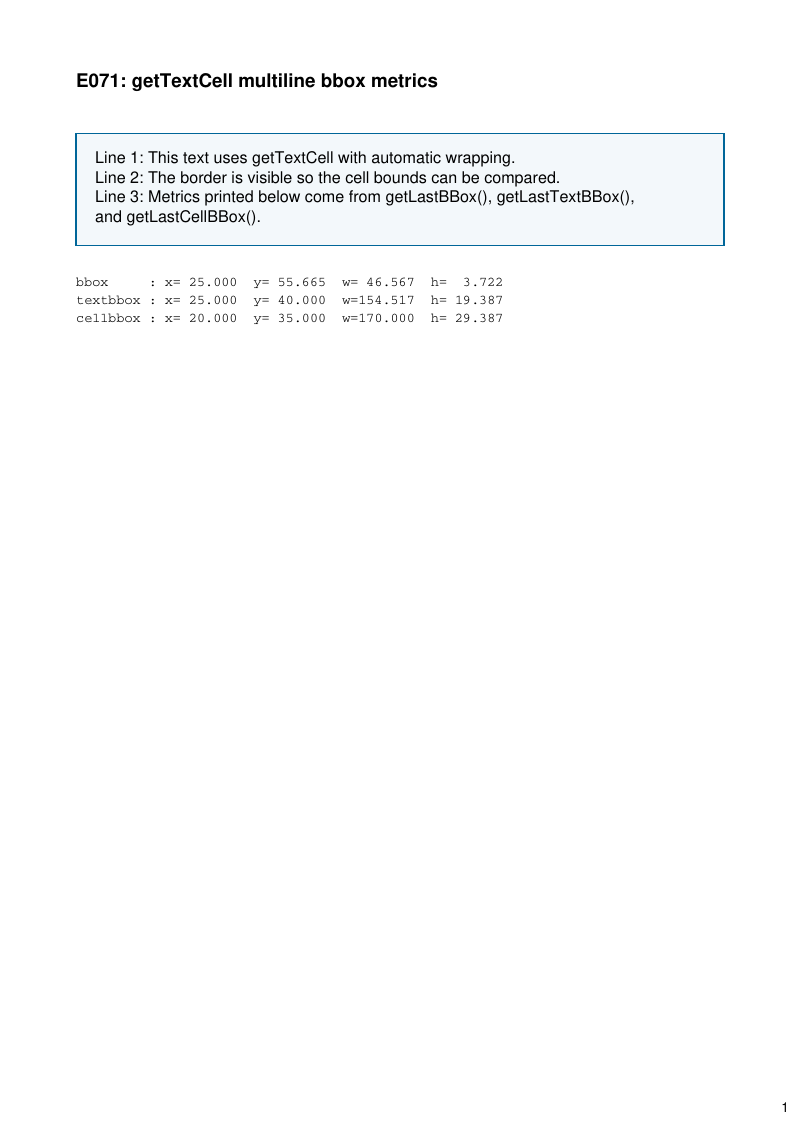
getTextCell() returning the content operators together with the bounding box and the metrics, so text can be positioned from what it measures.
- Rendered PDF: E071_gettextcell_bbox_metrics.pdf
- PHP source: E071_gettextcell_bbox_metrics.phps
- All examples: /examples/
- Category: Text and Typography
Source Code
<?php

declare(strict_types=1);

/**
 * E071_gettextcell_bbox_metrics.php
 *
 * @since       2026-05-06
 * @category    Library
 * @package     Pdf
 * @author      Nicola Asuni <info@tecnick.com>
 * @copyright   2002-2026 Nicola Asuni - Tecnick.com LTD
 * @license     https://www.gnu.org/copyleft/lesser.html GNU-LGPL v3 (see LICENSE)
 * @link        https://github.com/tecnickcom/tc-lib-pdf
 *
 * This file is part of tc-lib-pdf software library.
 */

// NOTE: local file reads (images, fonts, attachments) are restricted to an allowlist of
// trusted paths that covers this package tree, so run the examples in place. To read assets
// from other locations, list them in the 'allowedPaths' entry of the fileOptions constructor
// parameter (see E047_remote_resources_security.php).

// NOTE: run make fonts in the project root to generate the dependencies and example fonts.

// autoloader when using Composer
require __DIR__ . '/../vendor/autoload.php';

// define fonts directory
\define('K_PATH_FONTS', \realpath(__DIR__ . '/../vendor/tecnickcom/tc-lib-pdf-font/target/fonts'));

$pdf = new \Com\Tecnick\Pdf\Tcpdf(
    unit: \Com\Tecnick\Pdf\Page\Unit::Millimeter,
    isunicode: true,
    subsetfont: false,
    compress: true,
    mode: \Com\Tecnick\Pdf\PdfConformance::None,
    objEncrypt: null,
);

$pdf->setCreator('tc-lib-pdf');
$pdf->setAuthor('Nicola Asuni');
$pdf->setSubject('tc-lib-pdf example: 071');
$pdf->setTitle('getTextCell bbox metrics');
$pdf->setKeywords('TCPDF tc-lib-pdf example getTextCell bbox textbbox cellbbox');
$pdf->setPDFFilename('071_gettextcell_bbox_metrics.pdf');

$pdf->setViewerPreferences(['DisplayDocTitle' => true]);
$pdf->enableDefaultPageContent();

$baseFont = $pdf->font->insert($pdf->pon, 'helvetica', '', 12);

$pdf->addPage();

$titleFont = $pdf->font->insert($pdf->pon, 'helvetica', 'B', 14);
$textFont = $pdf->font->insert($pdf->pon, 'helvetica', '', 12);
$monoFont = $pdf->font->insert($pdf->pon, 'courier', '', 10);

$pdf->page->addContent($titleFont['out']);
$pdf->page->addContent($pdf->getTextCell(
    txt: 'E071: getTextCell multiline bbox metrics',
    posx: 20,
    posy: 20,
    width: 170,
    height: 0,
    offset: 0,
    linespace: 0,
    valign: \Com\Tecnick\Pdf\TextVAlign::Top,
    halign: \Com\Tecnick\Pdf\TextHAlign::Left,
));

$pdf->page->addContent($textFont['out']);

$blockStyles = [
    'all' => [
        'lineWidth' => 0.4,
        'lineCap' => 'butt',
        'lineJoin' => 'miter',
        'dashArray' => [],
        'dashPhase' => 0,
        'lineColor' => '#006699',
        'fillColor' => '#f3f8fb',
    ],
];

// Custom cell arrays use internal points, so convert desired 5 mm padding first.
$padding5mm = $pdf->toPoints(5.0);

$cellPadding5mm = [
    'margin' => [
        'T' => 0,
        'R' => 0,
        'B' => 0,
        'L' => 0,
    ],
    'padding' => [
        'T' => $padding5mm,
        'R' => $padding5mm,
        'B' => $padding5mm,
        'L' => $padding5mm,
    ],
    'borderpos' => \Com\Tecnick\Pdf\Tcpdf::BORDERPOS_DEFAULT,
];

$multiline =
    'Line 1: This text uses getTextCell with automatic wrapping.'
    . "\n"
    . 'Line 2: The border is visible so the cell bounds can be compared.'
    . "\n"
    . 'Line 3: Metrics printed below come from getLastBBox(), getLastTextBBox(), and getLastCellBBox().';

$pdf->page->addContent($pdf->getTextCell(
    txt: $multiline,
    posx: 20,
    posy: 35,
    width: 170,
    height: 0,
    offset: 0,
    linespace: 1.5,
    valign: \Com\Tecnick\Pdf\TextVAlign::Top,
    halign: \Com\Tecnick\Pdf\TextHAlign::Left,
    cell: $cellPadding5mm,
    styles: $blockStyles,
    strokewidth: 0,
    wordspacing: 0,
    leading: 0,
    rise: 0,
    jlast: true,
    fill: true,
    stroke: false,
    underline: false,
    linethrough: false,
    overline: false,
    clip: false,
    drawcell: true,
));

$bbox = $pdf->getLastBBox();
$textbbox = $pdf->getLastTextBBox();
$cellbbox = $pdf->getLastCellBBox();

$fmtMetric = static fn(float $value): string => \sprintf('%7.3F', $value);

$pdf->page->addContent($monoFont['out']);

$metricsText =
    'bbox     : x='
    . $fmtMetric($bbox['x'])
    . '  y='
    . $fmtMetric($bbox['y'])
    . '  w='
    . $fmtMetric($bbox['w'])
    . '  h='
    . $fmtMetric($bbox['h'])
    . "\n"
    . 'textbbox : x='
    . $fmtMetric($textbbox['x'])
    . '  y='
    . $fmtMetric($textbbox['y'])
    . '  w='
    . $fmtMetric($textbbox['w'])
    . '  h='
    . $fmtMetric($textbbox['h'])
    . "\n"
    . 'cellbbox : x='
    . $fmtMetric($cellbbox['x'])
    . '  y='
    . $fmtMetric($cellbbox['y'])
    . '  w='
    . $fmtMetric($cellbbox['w'])
    . '  h='
    . $fmtMetric($cellbbox['h']);

$metricsPosY = $cellbbox['y'] + $cellbbox['h'] + 8;

$pdf->page->addContent($pdf->getTextCell(
    txt: $metricsText,
    posx: 20,
    posy: $metricsPosY,
    width: 170,
    height: 0,
    offset: 0,
    linespace: 1,
    valign: \Com\Tecnick\Pdf\TextVAlign::Top,
    halign: \Com\Tecnick\Pdf\TextHAlign::Left,
));

$rawpdf = $pdf->getOutPDFString();
$pdf->renderPDF(rawpdf: $rawpdf);