
Encoding and rendering are separate steps. getBarcodeObj() returns an object holding the encoded grid, and the methods below turn that grid into whatever the target needs. Every one of them works for all 73 symbologies.
One object is built here and reused by every example on the page:
<?php

require_once __DIR__ . '/vendor/autoload.php';

$barcode = new \Com\Tecnick\Barcode\Barcode();
$bobj = $barcode->getBarcodeObj(
    type: 'QRCODE,H',
    code: 'https://tcpdf.org',
    width: -4,
    height: -4,
    color: 'black',
    padding: [-2, -2, -2, -2],
)->setBackgroundColor('white');
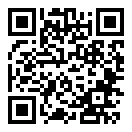
Sizes quoted below are the bytes that symbol produces, measured with tc-lib-barcode 2.16.2 on PHP 8.4.
SVG
Three methods, differing only in what surrounds the drawing.
getSvgCode() returns a standalone document, with the XML declaration and the namespace attributes, for writing to a .svg file:
file_put_contents('barcode.svg', $bobj->getSvgCode());
<?xml version="1.0" standalone="no" ?>
<svg version="1.2" baseProfile="full" xmlns="http://www.w3.org/2000/svg" ... width="132.000000" height="132.000000" viewBox="0 0 132.000000 132.000000">
	<desc>https://tcpdf.org</desc>
	<rect x="0" y="0" width="132.000000" height="132.000000" fill="#ffffff" ... />
	<g id="bars" fill="#000000" ...>
		<rect x="8.000000" y="8.000000" width="28.000000" height="4.000000" />
The payload goes into a <desc> element, which is what a screen reader announces and what makes a saved file identifiable later. Coordinates carry six decimals: stripping the trailing zeros takes this symbol from 33839 to 21286 bytes, a third of the file, with no change to the drawing.
getInlineSvgCode() drops the XML declaration so the markup can be embedded directly in an HTML page. 33800 bytes for this symbol.
getSvg() sends the document as an HTTP response with Content-Type: image/svg+xml, or writes it to a file when given a filename:
$bobj->getSvg();              // to the browser
$bobj->getSvg('barcode.svg'); // to a file
SVG is the right default for print and for the web: one file scales to any size, and a bar edge lands where the renderer puts it rather than where a pixel grid allows.
PNG
getPngData() returns the bytes. Imagick renders them when the extension is loaded, GD otherwise, and passing false forces GD:
$png = $bobj->getPngData();       // Imagick when available
$png = $bobj->getPngData(false);  // GD
$png = $bobj->getPngDataImagick(); // requires the imagick extension
When no renderer is available, getPngData() throws a BarcodeException: with neither extension loaded by default, without gd when GD is forced. getPngDataImagick() requires imagick in the same way.
371 bytes through Imagick, 344 through GD, against 21286 for the trimmed SVG. A barcode is a few solid rectangles, which is the case PNG compresses best, so the raster form is smaller here than the vector one. It stops being smaller as soon as the symbol is scaled up for print.
getPng() sends it as an HTTP response or writes a file, like its SVG counterpart:
$bobj->getPng();              // to the browser
$bobj->getPng('barcode.png'); // to a file
For an HTML page, a data URI avoids the second request:
echo '<img alt="' . htmlspecialchars($bobj->getExtendedCode()) . '"'
    . ' src="data:image/png;base64,' . base64_encode($bobj->getPngData()) . '">';
GD Image
getGd() hands back the \GdImage resource instead of encoded bytes, for composing the symbol into a larger image. It requires the gd extension and throws a BarcodeException without it:
$img = $bobj->getGd();
imagecopy($label, $img, 40, 120, 0, 0, imagesx($img), imagesy($img));
HTML
getHtmlDiv() draws the symbol as absolutely positioned div elements inside a relative container:
<div style="width:132.000000px;height:132.000000px;position:relative;...background-color:rgb(255,255,255);">
	<div style="background-color:rgb(0,0,0);left:8.000000px;top:8.000000px;width:28.000000px;height:4.000000px;position:absolute;"></div>
77711 bytes for this symbol, against 21286 of SVG. It exists for environments that will not accept an image or a data URI at all; where they will, use one of those.
Character Grid
getGrid() returns the module matrix as text, one character per module, rows separated by newlines. The two characters are arguments, so the same call serves a debug dump and a terminal preview:
echo $bobj->getGrid();          // '0' and '1', the default
echo $bobj->getGrid('.', '#');  // any pair of characters
An Aztec Rune, at 11 by 11 the smallest symbol the library draws, shows the whole thing:
11110101101      ####.#.##.#
11111111111      ###########
11000000011      ##.......##
11011111011      ##.#####.##
01010001010      .#.#...#.#.
01010101010      .#.#.#.#.#.
01010001011      .#.#...#.##
01011111011      .#.#####.##
11000000010      ##.......#.
01111111111      .##########
00111101000      ..####.#...
The library’s own demo passes U+00A0 and U+2584, which draws a symbol a phone can read off the terminal.
getGridArray() returns the same matrix as an array of rows, each row an array of one-character strings, for walking the modules in code. The QR Code above is 870 bytes as a grid string, which makes that form the cheapest way to cache an encoded symbol and draw it later.
Bar Coordinates
Three methods hand over the geometry instead of a picture, for drawing into a PDF page, a canvas, or a plotter.
getBarsArrayXYWH() gives [x, y, width, height] per bar, in user units, with the scale and the padding already applied:
print_r(array_slice($bobj->getBarsArrayXYWH(), 0, 3));
[[8, 8, 28, 4], [40, 8, 4, 4], [52, 8, 8, 4]]
getBarsArrayXYXY() gives the same rectangles as [x1, y1, x2, y2], the opposite corners, for APIs that take them that way.
getArray() returns everything, and its bars are in module units rather than user units, so [0, 0, 7, 1] is a run of seven modules on the first row: the type, the format, the parameters, the payload and its extended form, the grid dimensions, the ratios, the padding, the resolved colour objects, and the bars.
$data = $bobj->getArray();
// type, format, params, code, extcode, ncols, nrows, width, height,
// width_ratio, height_ratio, padding, full_width, full_height,
// color_obj, bg_color_obj, bars
This is the form to reach for when the symbol goes straight into a PDF content stream or a canvas: no intermediate image, each bar becomes one filled rectangle.
Reading the Payload Back
getExtendedCode() returns the payload as it was actually encoded, which is often not what went in:
$barcode->getBarcodeObj('EAN13', '9781234567897')->getExtendedCode();  // 9781234567897
$barcode->getBarcodeObj('UPCE', '725277')->getExtendedCode();          // 0072527000078
$barcode->getBarcodeObj('S25+', '0123456789')->getExtendedCode();      // 01234567895
$barcode->getBarcodeObj('GS114', '9501101020917')->getExtendedCode();  // (01)95011010209176
An appended check digit, a compressed UPC-E expanded to its full form, a GS1 element string with its Application Identifiers in brackets: this is the string to print underneath the symbol as the human readable interpretation.
Choosing
| Method | This symbol | Use it for |
|---|---|---|
getSvgCode(), getSvg() | 21286 bytes trimmed | print, and anything that will be scaled |
getInlineSvgCode() | 33800 bytes | embedding in an HTML document |
getPngData() | 371 bytes | a fixed-size web preview, email, a raster pipeline |
getGd() | an image resource | compositing into a larger image |
getHtmlDiv() | 77711 bytes | an environment that refuses images |
getGrid(), getGridArray() | 870 bytes | caching, testing, terminal output |
getBarsArrayXYWH(), getArray() | 220 bars | drawing into a PDF or another canvas |
See Also
- tc-lib-barcode : the library overview.
- Rendering Options : size, scale, padding and colour.
- Linear, 2D, Postal : the 73 symbologies.
- E020 barcodes : every symbology drawn into one PDF by tc-lib-pdf.