
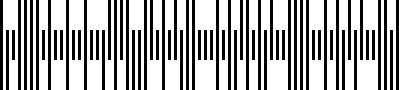
Japan Post’s customer barcode carries the seven-digit postal code followed by the part of the address that identifies the delivery point. Bars take three shapes, and the alphabetic parts of an address are encoded through control characters, which is why the drawn symbol is longer than the text suggests.
Type Token
| Item | Value |
|---|---|
| Type token | JPPOST |
| Enum case | BarcodeType::JPPOST |
| Family | Postal |
| Class | \Com\Tecnick\Barcode\Type\Linear\JapanPost |
Input
| Item | Value |
|---|---|
| Character set | 0-9, A-Z and - |
| Length | a 7 digit postal code, then up to 13 characters of address |
| Check | modulo 19, appended by the library |
| Extra parameters | none |
Examples
A postal code and address
<?php

require_once __DIR__ . '/vendor/autoload.php';

$barcode = new \Com\Tecnick\Barcode\Barcode();
$bobj = $barcode->getBarcodeObj(
    type: 'JPPOST',
    code: '910-00673-80-25J1-2B',
    width: -3,
    height: -30,
    color: 'black',
    padding: [0, 0, 0, 0],
)->setBackgroundColor('white');

echo $bobj->getInlineSvgCode();
Errors
These payloads raise \Com\Tecnick\Barcode\Exception:
| Payload | Message |
|---|---|
910 | The code must start with the 7 digit postal code |
910-00673! | Invalid character: 33 |
See Also
- tc-lib-barcode : the library overview.
- Rendering Options : size, colour, padding.
- Output Formats : every renderer.
- Australia Post 4-State : another four-state customer format.
- API reference : the generated class documentation.