
getBarcodeObj() takes the same six arguments for all 73 symbologies. This page covers them once; the per-type pages give the payload rules and leave the geometry here.
$bobj = $barcode->getBarcodeObj(
    type: 'C128',
    code: 'TCPDF',
    width: -2,
    height: -30,
    color: 'black',
    padding: [0, 0, 0, 0],
);
Width and Height
The sign decides the unit.
A positive value is a total measurement in user units, and the symbol is scaled to fit it. This is the form to use when the space on the label is fixed:
$bobj = $barcode->getBarcodeObj('C128', 'TCPDF', 120, 40, 'black', [0, 0, 0, 0])
    ->setBackgroundColor('white');
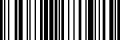
A negative value is a multiplier applied per column and per row of the encoded grid. The symbol then comes out at whatever size the data needs, which is the form to use when the payload length varies:
$bobj = $barcode->getBarcodeObj('C128', 'TCPDF', -2, -30, 'black', [0, 0, 0, 0])
    ->setBackgroundColor('white');

The same payload produced 90 columns in one row, so -2, -30 gives 180 by 30 user units. Linear symbologies have one row, which is why their height multiplier is a large number and their width multiplier a small one. For a matrix symbology both multipliers are the module size, and -4, -4 is the usual starting point.
Prefer the multiplier form where you can. A positive width that is not a whole multiple of the column count puts module edges on fractional coordinates, and a printer resolves that by rounding, which is how bar widths drift.
setSize() changes all of it afterwards:
$bobj->setSize(-3, -40, [0, 0, 0, 0]);
Padding
Four values, in the order top, right, bottom, left, following the same sign rule.
$bobj = $barcode->getBarcodeObj('C128', 'TCPDF', -2, -30, 'black', [8, 8, 8, 8])
    ->setBackgroundColor('white');
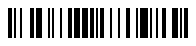
Negative padding multiplies by the row or column unit rather than by the module, so on a linear symbol whose height multiplier is 30, a padding of -2 adds 60 user units above and below. On a matrix symbology the unit is the module and the negative form is the natural one, which is how the quiet zone is usually expressed:
$bobj = $barcode->getBarcodeObj('QRCODE,H', 'https://tcpdf.org', -4, -4, 'black', [-2, -2, -2, -2])
    ->setBackgroundColor('white');
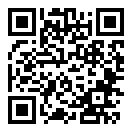
Quiet zone is what most unreadable labels are short of. The specification for each symbology states a minimum; measure the printed result against it rather than the screen.
Colour
The foreground is the color argument, the background is set separately:
$bobj = $barcode->getBarcodeObj('C128', 'TCPDF', -2, -30, '#1d4ed8', [8, 8, 8, 8])
    ->setBackgroundColor('#fde047');

Both go through tc-lib-color, so a colour name, a hexadecimal value, CSS syntax or a PDF spot colour name all work. setColor() changes the foreground after construction.
The background defaults to transparent. That is the right default for placing a symbol on a coloured panel, and the wrong one for a page that might be dark: black bars on a transparent background become black bars on black. Every example on this site sets it explicitly for that reason.
Scanners read dark bars on a light background. Inverting that, or choosing a foreground and background without enough contrast between them, produces a symbol that looks correct and does not scan.
The Type Token
The first argument is the symbology token, optionally followed by comma-separated parameters:
$barcode->getBarcodeObj('QRCODE,H', 'https://tcpdf.org', -4, -4);
The same token exists as a backed enum, which turns a typo into an error at the call site rather than an exception at run time:
use Com\Tecnick\Barcode\BarcodeType;

$barcode->getBarcodeObj(BarcodeType::QRCODE, 'https://tcpdf.org', -4, -4);
Extra parameters are still appended to the string form, so the enum and the parameters do not mix in one argument. Which parameters a type accepts is on its own page; the full enum list is in /docs/enums/.
Limits
| Limit | Value | What it applies to |
|---|---|---|
Barcode::MAX_CODE_LENGTH | 30000 bytes | the payload, before encoding |
Type::MAX_IMAGE_SIDE | 30000 | either side of a rendered raster image |
Both raise \Com\Tecnick\Barcode\Exception. The payload cap is well above what any symbology here can encode, so in practice a long payload fails the symbology’s own capacity check first, with a message naming the real limit.
See Also
- tc-lib-barcode : the library overview.
- Output Formats : SVG, PNG, HTML, grids and coordinates.
- Linear, 2D, Postal : the 73 symbologies.
- tc-lib-color : how the colour arguments are parsed.